> ## Documentation Index
> Fetch the complete documentation index at: https://docs.neynar.com/llms.txt
> Use this file to discover all available pages before exploring further.
# How to Create a Farcaster Channel Feed
> Create a feed for any channel (i.e. parent_url) on Farcaster protocol
### API endpoint
This tutorial uses the [GET v2/feed](/reference/fetch-user-following-feed) endpoint
Imagine you want to create a feed for casts in the Neynar channel. Casts on the Farcaster protocol can be under any `parent_url`, `parent_url`s are just arbitrary strings. Different clients choose to show their chosen list of `parent_urls` and some clients like Warpcast refer to them as "channels".
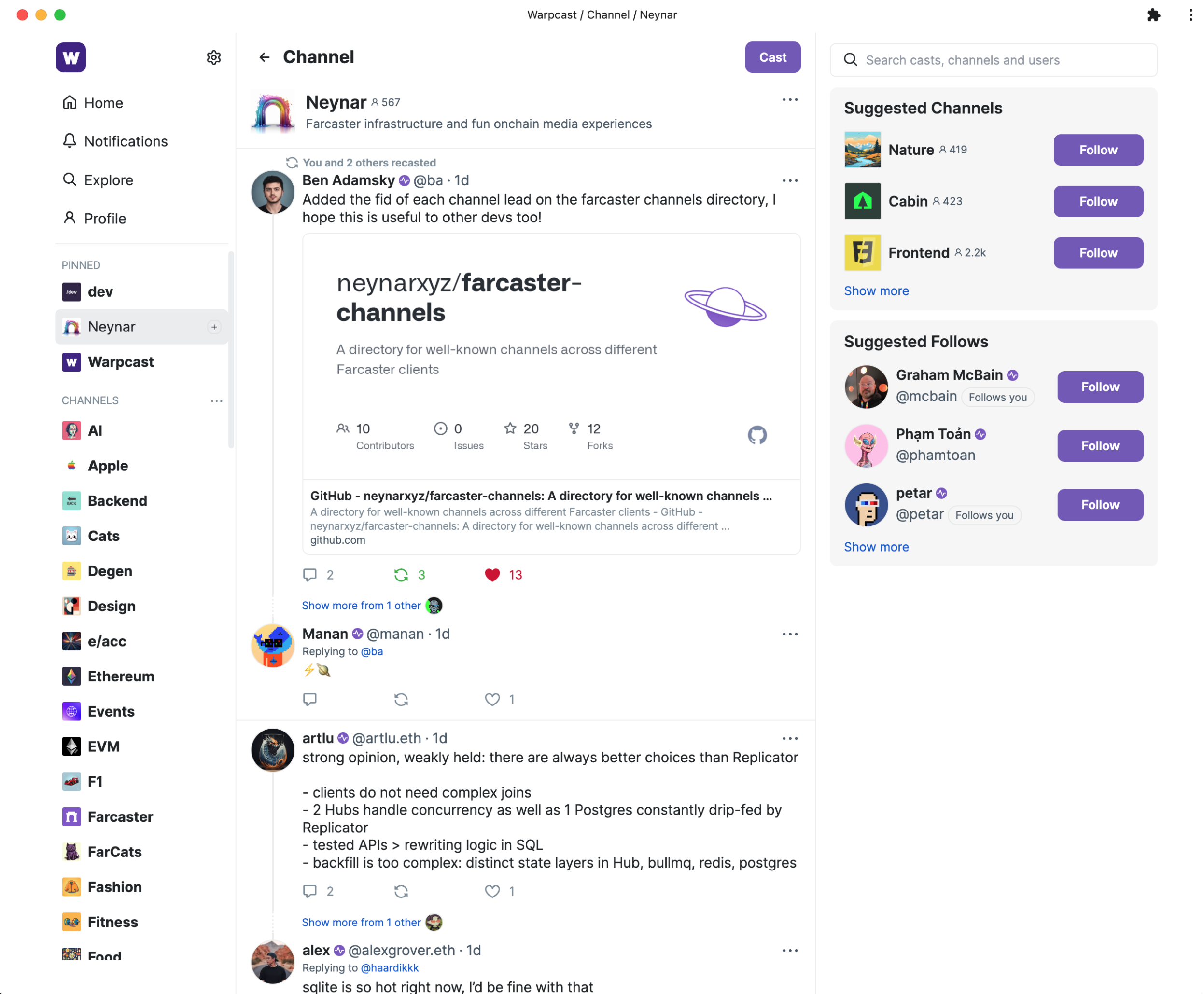 ## Create a channel feed
In this example, we will try to create a feed for the Neynar channel. If you are looking for the `parent_url`s for the channels on Warpcast, you can find them in the [Farcaster Channels Repository](https://github.com/neynarxyz/farcaster-channels/blob/main/warpcast.json). You will need the right `parent_url` to fetch channel data.
#### Ensure you have the right environment setup
Make sure to have node.js, typescript (ts) and yarn installed on your machine
* Install [node.js and npm](https://nodejs.org/en/download/)
* Install [yarn](https://classic.yarnpkg.com/lang/en/docs/install/#mac-stable)
* Install [ts-node](https://www.npmjs.com/package/ts-node#installation) globally
#### Create a new typescript file with the right imports
```js theme={"system"}
import { NeynarAPIClient, isApiErrorResponse } from "@neynar/nodejs-sdk";
import { AxiosError } from "axios";
import {
FeedType, FilterType,
} from "@neynar/nodejs-sdk/build/neynar-api/neynar-v2-api";
```
#### Initialize the client
```bash theme={"system"}
const client = new NeynarAPIClient("API_KEY");
```
#### Call `fetchFeedPage` function to get feed
```js theme={"system"}
(async () => {
try {
const cast =
await client.fetchFeedPage(FeedType.Filter, {
filterType: FilterType.ParentUrl,
parentUrl: "chain://eip155:1/erc721:0xd4498134211baad5846ce70ce04e7c4da78931cc",
limit: 1, // change to however many casts you want to fetch at once (max 100)
withRecasts: true,
});
console.log(JSON.stringify(cast));
} catch (error) {
// isApiErrorResponse can be used to check for Neynar API errors
// handle errors accordingly
if (isApiErrorResponse(error)) {
console.log("API Error", error.response.data);
} else {
console.log("Generic Error", error);
}
}
})();
```
#### Run your new .ts file
* Navigate to the right folder in your terminal e.g. `cd ./test-sdk`
* Run script by typing `yarn start` into the terminal
#### You should now see an output like this
```json theme={"system"}
{
"casts": [
{
"hash": "0xfb5f785e80cab58bb3ca9f3087b812d320846043",
"thread_hash": "0xfb5f785e80cab58bb3ca9f3087b812d320846043",
"parent_hash": null,
"parent_url": "chain://eip155:1/erc721:0xd4498134211baad5846ce70ce04e7c4da78931cc",
"parent_author": {
"fid": null
},
"author": {
"object": "user",
"fid": 976,
"custody_address": "0xae6706fe1cb6887e5ed9b2e7e64ba78ba9c5e785",
"username": "ba",
"display_name": "Ben Adamsky",
"pfp_url": "https://i.seadn.io/gae/-pmvC99Hw8fLjFKEIT3GxNs7qBhivAAUlIuVNXAykd06pUWSiAsypeLL8Q28dkjRtgXtNp07dLECv2p9P5MiqTrcmCR9OyYnAmO27Q?w=500&auto=format",
"profile": {
"bio": {
"text": "surveyooor @survey x @ponder, eng @ freeport.app, benadamsky.com",
"mentioned_profiles": []
}
},
"follower_count": 472,
"following_count": 345,
"verifications": [
"0x64ff33b653b26edcb4644e27d3720f3c653f8371"
],
"active_status": "active"
},
"text": "Added the fid of each channel lead on the farcaster channels directory, I hope this is useful to other devs too!\n\nhttps://github.com/neynarxyz/farcaster-channels",
"timestamp": "2023-11-15T21:42:45.000Z",
"embeds": [
{
"url": "https://github.com/neynarxyz/farcaster-channels"
}
],
"reactions": {
"likes": [
{
"fid": 6546,
"fname": "artlu"
},
{
"fid": 10259,
"fname": "alexgrover"
},
{
"fid": 299,
"fname": "stout"
},
],
"recasts": [
{
"fid": 616,
"fname": "dylsteck"
},
{
"fid": 2455,
"fname": "notdevin.eth"
},
{
"fid": 194,
"fname": "rish"
}
]
},
"replies": {
"count": 2
},
"mentioned_profiles": []
}
],
"next": {
"cursor": "eyJ0aW1lc3RhbXAiOiIyMDIzLTExLTE1IDIxOjQyOjQ1LjAwMDAwMDAifQ=="
}
}
```
**You get all the data in one request, making it easy to display or use in your next operation.** If you want to try getting a live response, head over to our API page for [v2/feed](/reference/fetch-user-following-feed).
You can take the cursor from the output and pass it in the next request to the SDK to page to the next set of results.
### Ready to start building?
Get your subscription at [neynar.com](https://neynar.com) and reach out to us on [Slack](https://neynar.com/slack) with any questions!
## Create a channel feed
In this example, we will try to create a feed for the Neynar channel. If you are looking for the `parent_url`s for the channels on Warpcast, you can find them in the [Farcaster Channels Repository](https://github.com/neynarxyz/farcaster-channels/blob/main/warpcast.json). You will need the right `parent_url` to fetch channel data.
#### Ensure you have the right environment setup
Make sure to have node.js, typescript (ts) and yarn installed on your machine
* Install [node.js and npm](https://nodejs.org/en/download/)
* Install [yarn](https://classic.yarnpkg.com/lang/en/docs/install/#mac-stable)
* Install [ts-node](https://www.npmjs.com/package/ts-node#installation) globally
#### Create a new typescript file with the right imports
```js theme={"system"}
import { NeynarAPIClient, isApiErrorResponse } from "@neynar/nodejs-sdk";
import { AxiosError } from "axios";
import {
FeedType, FilterType,
} from "@neynar/nodejs-sdk/build/neynar-api/neynar-v2-api";
```
#### Initialize the client
```bash theme={"system"}
const client = new NeynarAPIClient("API_KEY");
```
#### Call `fetchFeedPage` function to get feed
```js theme={"system"}
(async () => {
try {
const cast =
await client.fetchFeedPage(FeedType.Filter, {
filterType: FilterType.ParentUrl,
parentUrl: "chain://eip155:1/erc721:0xd4498134211baad5846ce70ce04e7c4da78931cc",
limit: 1, // change to however many casts you want to fetch at once (max 100)
withRecasts: true,
});
console.log(JSON.stringify(cast));
} catch (error) {
// isApiErrorResponse can be used to check for Neynar API errors
// handle errors accordingly
if (isApiErrorResponse(error)) {
console.log("API Error", error.response.data);
} else {
console.log("Generic Error", error);
}
}
})();
```
#### Run your new .ts file
* Navigate to the right folder in your terminal e.g. `cd ./test-sdk`
* Run script by typing `yarn start` into the terminal
#### You should now see an output like this
```json theme={"system"}
{
"casts": [
{
"hash": "0xfb5f785e80cab58bb3ca9f3087b812d320846043",
"thread_hash": "0xfb5f785e80cab58bb3ca9f3087b812d320846043",
"parent_hash": null,
"parent_url": "chain://eip155:1/erc721:0xd4498134211baad5846ce70ce04e7c4da78931cc",
"parent_author": {
"fid": null
},
"author": {
"object": "user",
"fid": 976,
"custody_address": "0xae6706fe1cb6887e5ed9b2e7e64ba78ba9c5e785",
"username": "ba",
"display_name": "Ben Adamsky",
"pfp_url": "https://i.seadn.io/gae/-pmvC99Hw8fLjFKEIT3GxNs7qBhivAAUlIuVNXAykd06pUWSiAsypeLL8Q28dkjRtgXtNp07dLECv2p9P5MiqTrcmCR9OyYnAmO27Q?w=500&auto=format",
"profile": {
"bio": {
"text": "surveyooor @survey x @ponder, eng @ freeport.app, benadamsky.com",
"mentioned_profiles": []
}
},
"follower_count": 472,
"following_count": 345,
"verifications": [
"0x64ff33b653b26edcb4644e27d3720f3c653f8371"
],
"active_status": "active"
},
"text": "Added the fid of each channel lead on the farcaster channels directory, I hope this is useful to other devs too!\n\nhttps://github.com/neynarxyz/farcaster-channels",
"timestamp": "2023-11-15T21:42:45.000Z",
"embeds": [
{
"url": "https://github.com/neynarxyz/farcaster-channels"
}
],
"reactions": {
"likes": [
{
"fid": 6546,
"fname": "artlu"
},
{
"fid": 10259,
"fname": "alexgrover"
},
{
"fid": 299,
"fname": "stout"
},
],
"recasts": [
{
"fid": 616,
"fname": "dylsteck"
},
{
"fid": 2455,
"fname": "notdevin.eth"
},
{
"fid": 194,
"fname": "rish"
}
]
},
"replies": {
"count": 2
},
"mentioned_profiles": []
}
],
"next": {
"cursor": "eyJ0aW1lc3RhbXAiOiIyMDIzLTExLTE1IDIxOjQyOjQ1LjAwMDAwMDAifQ=="
}
}
```
**You get all the data in one request, making it easy to display or use in your next operation.** If you want to try getting a live response, head over to our API page for [v2/feed](/reference/fetch-user-following-feed).
You can take the cursor from the output and pass it in the next request to the SDK to page to the next set of results.
### Ready to start building?
Get your subscription at [neynar.com](https://neynar.com) and reach out to us on [Slack](https://neynar.com/slack) with any questions!