> ## Documentation Index
> Fetch the complete documentation index at: https://docs.neynar.com/llms.txt
> Use this file to discover all available pages before exploring further.
# How to fetch Farcaster feed for a given user
> Fetch the casts that should appear on the home feed for a certain fid
### API endpoint
This tutorial uses the [GET v2/feed](/reference/fetch-user-following-feed) endpoint
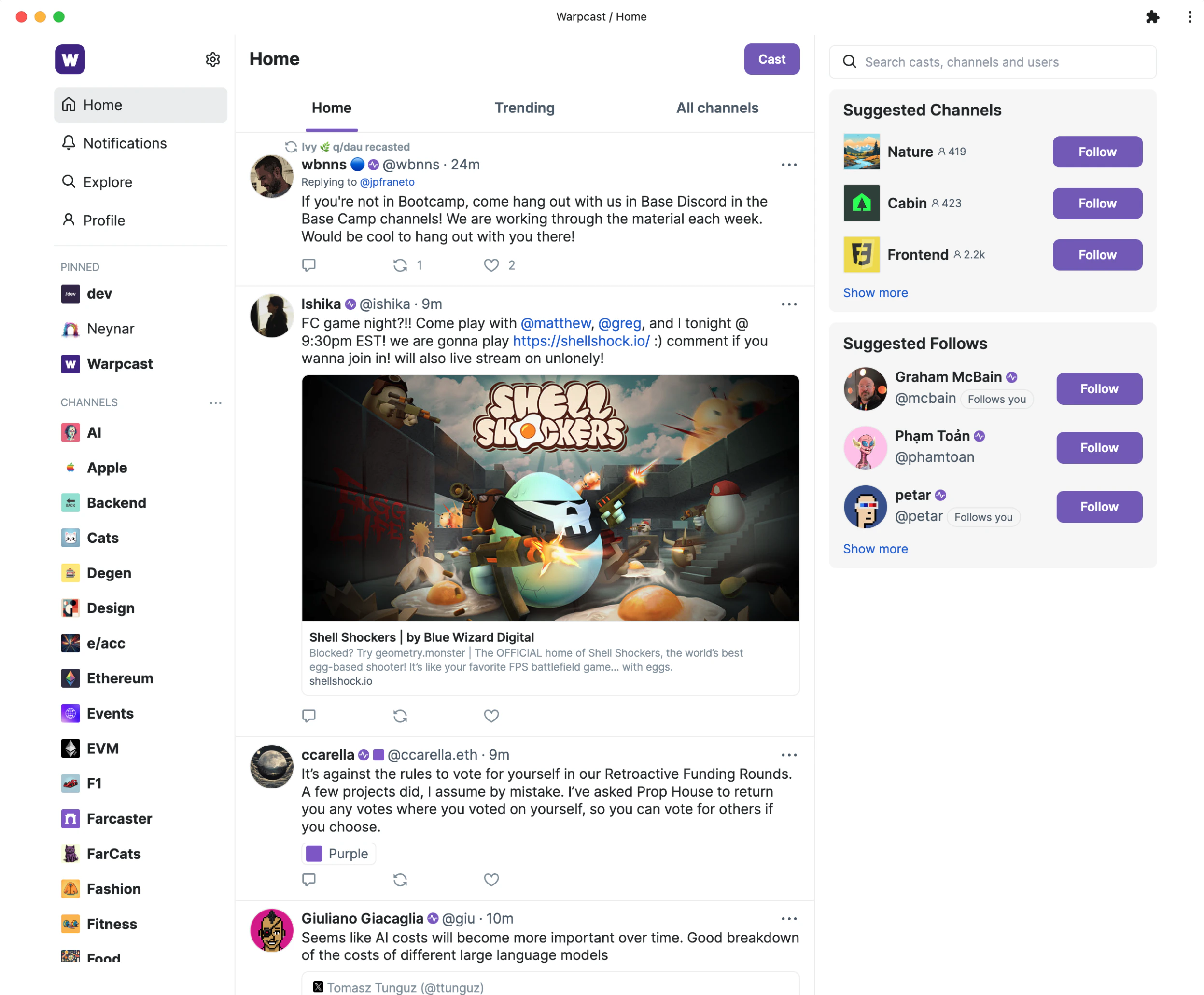
To get the feed for a farcaster user, you traditionally, you have to run a hub or get access to a hosted indexer. You have to fetch the graph of the user, the raw cast data from that graph, mentioned profiles, reactions, profile of the authors, (long list of things...), and stitch it back into the final feed object before you can render it. Thankfully, Neynar's SDK and APIs make this much simpler!
 ## Fetch feed for a user easily with Neynar SDK
In this example, we will try to get rish's feed who's fid is 194. If you know someone's username, you can find their fid from our [user endpoint](/reference/search-user).
#### Ensure you have the right environment setup
Make sure to have node.js, typescript (ts) and yarn installed on your machine
* Install [node.js and npm](https://nodejs.org/en/download/)
* Install [yarn](https://classic.yarnpkg.com/lang/en/docs/install/#mac-stable)
* Install [ts-node](https://www.npmjs.com/package/ts-node#installation) globally
#### Create a new typescript file with the right imports
```js theme={"system"}
import { NeynarAPIClient, isApiErrorResponse } from "@neynar/nodejs-sdk";
import { AxiosError } from "axios";
import {
FeedType,
} from "@neynar/nodejs-sdk/build/neynar-api/neynar-v2-api";
```
#### Initialize the client
```js theme={"system"}
const client = new NeynarAPIClient("API_KEY");
```
#### Call `fetchFeedPage` function to get feed
```js theme={"system"}
(async () => {
try {
const cast =
await client.fetchFeedPage(FeedType.Following, {
fid: 194,
limit: 2, // change to however many casts you want to fetch at once (max 100)
withRecasts: true,
});
console.log(JSON.stringify(cast));
} catch (error) {
// isApiErrorResponse can be used to check for Neynar API errors
// handle errors accordingly
if (isApiErrorResponse(error)) {
console.log("API Error", error.response.data);
} else {
console.log("Generic Error", error);
}
}
})();
```
#### Run your new .ts file
* Navigate to the right folder in your terminal e.g. `cd ./test-sdk`
* Run script by typing `yarn start` into the terminal
#### You should now see an output like this
```json theme={"system"}
{
"casts": [
{
"hash": "0x0d46810395803ff75221c5deac1d872db22aac99",
"thread_hash": "0x0d46810395803ff75221c5deac1d872db22aac99",
"parent_hash": null,
"parent_url": null,
"parent_author": {
"fid": null
},
"author": {
"object": "user",
"fid": 1287,
"custody_address": "0x19c29a3cea8733314e501d42f1a0d6dcb23e1b3d",
"username": "july",
"display_name": "July",
"pfp_url": "https://i.seadn.io/gcs/files/ed56e6b9a1b22720ce7490524db333e0.jpg?w=500&auto=format",
"profile": {
"bio": {
"text": "mostly creating and destroying; used to build flying cars & autonomous vehicles, now working on @faust",
"mentioned_profiles": []
}
},
"follower_count": 12787,
"following_count": 879,
"verifications": [
"0xdd3bf199e65bba74144a9a1c0dfaeda32b911121"
],
"active_status": "active"
},
"app": {
"object": "user_dehydrated",
"fid": 9152,
"username": "warpcast",
"display_name": "Warpcast",
"pfp_url": "https://i.imgur.com/3d6fFAI.png"
},
"text": "Constantly reminded that doing anything, is really difficult. Whether it is building a product, launching a service, hosting a party, parenting, supporting parents, finding like minded friends, thinking deeply about problems - and solving them",
"timestamp": "2023-11-16T23:26:03.000Z",
"embeds": [],
"reactions": {
"likes": [
{
"fid": 557,
"fname": "pugson"
},
{
"fid": 2745,
"fname": "sdv"
},
{
"fid": 4215,
"fname": "sa"
},
],
"recasts": [
{
"fid": 557,
"fname": "pugson"
},
{
"fid": 193173,
"fname": "winnykim"
},
]
},
"replies": {
"count": 3
},
"mentioned_profiles": []
},
],
"next": {
"cursor": "eyJ0aW1lc3RhbXAiOiIyMDIzLTExLTE3IDAxOjIyOjI1LjAwMDAwMDAifQ=="
}
}
```
**You get all the data in one request, making it easy to display or use in your next operation.** If you want to try getting a live response, head over to our API page for [v2/feed](/reference/fetch-user-following-feed).
You can take the cursor from the output and pass it in the next request to the SDK to page to the next set of results.
### Ready to start building?
Get your subscription at [neynar.com](https://neynar.com) and reach out to us on [Slack](https://neynar.com/slack) with any questions!
## Fetch feed for a user easily with Neynar SDK
In this example, we will try to get rish's feed who's fid is 194. If you know someone's username, you can find their fid from our [user endpoint](/reference/search-user).
#### Ensure you have the right environment setup
Make sure to have node.js, typescript (ts) and yarn installed on your machine
* Install [node.js and npm](https://nodejs.org/en/download/)
* Install [yarn](https://classic.yarnpkg.com/lang/en/docs/install/#mac-stable)
* Install [ts-node](https://www.npmjs.com/package/ts-node#installation) globally
#### Create a new typescript file with the right imports
```js theme={"system"}
import { NeynarAPIClient, isApiErrorResponse } from "@neynar/nodejs-sdk";
import { AxiosError } from "axios";
import {
FeedType,
} from "@neynar/nodejs-sdk/build/neynar-api/neynar-v2-api";
```
#### Initialize the client
```js theme={"system"}
const client = new NeynarAPIClient("API_KEY");
```
#### Call `fetchFeedPage` function to get feed
```js theme={"system"}
(async () => {
try {
const cast =
await client.fetchFeedPage(FeedType.Following, {
fid: 194,
limit: 2, // change to however many casts you want to fetch at once (max 100)
withRecasts: true,
});
console.log(JSON.stringify(cast));
} catch (error) {
// isApiErrorResponse can be used to check for Neynar API errors
// handle errors accordingly
if (isApiErrorResponse(error)) {
console.log("API Error", error.response.data);
} else {
console.log("Generic Error", error);
}
}
})();
```
#### Run your new .ts file
* Navigate to the right folder in your terminal e.g. `cd ./test-sdk`
* Run script by typing `yarn start` into the terminal
#### You should now see an output like this
```json theme={"system"}
{
"casts": [
{
"hash": "0x0d46810395803ff75221c5deac1d872db22aac99",
"thread_hash": "0x0d46810395803ff75221c5deac1d872db22aac99",
"parent_hash": null,
"parent_url": null,
"parent_author": {
"fid": null
},
"author": {
"object": "user",
"fid": 1287,
"custody_address": "0x19c29a3cea8733314e501d42f1a0d6dcb23e1b3d",
"username": "july",
"display_name": "July",
"pfp_url": "https://i.seadn.io/gcs/files/ed56e6b9a1b22720ce7490524db333e0.jpg?w=500&auto=format",
"profile": {
"bio": {
"text": "mostly creating and destroying; used to build flying cars & autonomous vehicles, now working on @faust",
"mentioned_profiles": []
}
},
"follower_count": 12787,
"following_count": 879,
"verifications": [
"0xdd3bf199e65bba74144a9a1c0dfaeda32b911121"
],
"active_status": "active"
},
"app": {
"object": "user_dehydrated",
"fid": 9152,
"username": "warpcast",
"display_name": "Warpcast",
"pfp_url": "https://i.imgur.com/3d6fFAI.png"
},
"text": "Constantly reminded that doing anything, is really difficult. Whether it is building a product, launching a service, hosting a party, parenting, supporting parents, finding like minded friends, thinking deeply about problems - and solving them",
"timestamp": "2023-11-16T23:26:03.000Z",
"embeds": [],
"reactions": {
"likes": [
{
"fid": 557,
"fname": "pugson"
},
{
"fid": 2745,
"fname": "sdv"
},
{
"fid": 4215,
"fname": "sa"
},
],
"recasts": [
{
"fid": 557,
"fname": "pugson"
},
{
"fid": 193173,
"fname": "winnykim"
},
]
},
"replies": {
"count": 3
},
"mentioned_profiles": []
},
],
"next": {
"cursor": "eyJ0aW1lc3RhbXAiOiIyMDIzLTExLTE3IDAxOjIyOjI1LjAwMDAwMDAifQ=="
}
}
```
**You get all the data in one request, making it easy to display or use in your next operation.** If you want to try getting a live response, head over to our API page for [v2/feed](/reference/fetch-user-following-feed).
You can take the cursor from the output and pass it in the next request to the SDK to page to the next set of results.
### Ready to start building?
Get your subscription at [neynar.com](https://neynar.com) and reach out to us on [Slack](https://neynar.com/slack) with any questions!