> ## Documentation Index
> Fetch the complete documentation index at: https://docs.neynar.com/llms.txt
> Use this file to discover all available pages before exploring further.
# How to set up Neynar webhooks through your developer portal
> Setting up Farcaster webhooks through Neynar developer portal
Neynar webhooks are a way to receive real-time updates about events on the Farcaster protocol. You can use webhooks to build integrations that respond to events on the protocol, such as when a user creates a cast or when a user updates their profile.
This guide will show you how to set up a webhook in the Neynar developer portal and how to integrate it into your application.
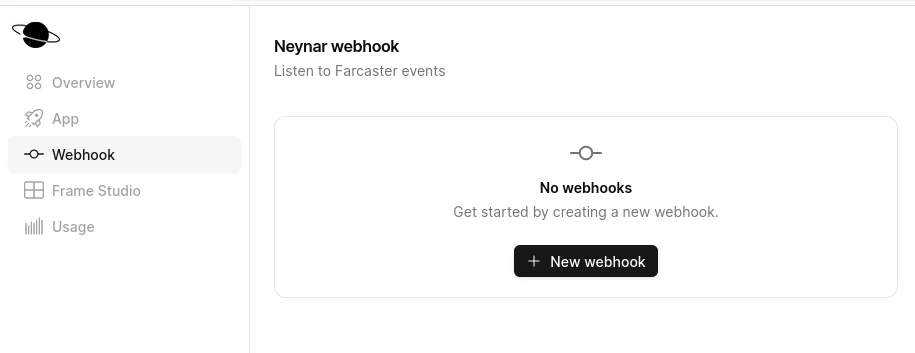
First, log in to the [Neynar developer portal](https://dev.neynar.com/) and navigate to the "Webhooks" tab. Click the "Create Webhook" button to create a new webhook.
 The webhook will fire to the specified `target_url`. To test it out, we can use a service like [ngrok](https://ngrok.com/) to create a public URL that will forward requests to your local server.
Let's create a simple server that logs out the event. We will be using Bun JavaScript.
```javascript Javascript theme={"system"}
Bun.serve({
async fetch(req) {
console.log(await req.json());
return new Response("Neynar webhook!");
},
});
```
Next: run `bun serve index.ts`, and run ngrok with `ngrok http 3000`. Copy the ngrok URL and paste it into the "Target URL" field in the Neynar developer portal.
The webhook will fire to the specified `target_url`. To test it out, we can use a service like [ngrok](https://ngrok.com/) to create a public URL that will forward requests to your local server.
Let's create a simple server that logs out the event. We will be using Bun JavaScript.
```javascript Javascript theme={"system"}
Bun.serve({
async fetch(req) {
console.log(await req.json());
return new Response("Neynar webhook!");
},
});
```
Next: run `bun serve index.ts`, and run ngrok with `ngrok http 3000`. Copy the ngrok URL and paste it into the "Target URL" field in the Neynar developer portal.
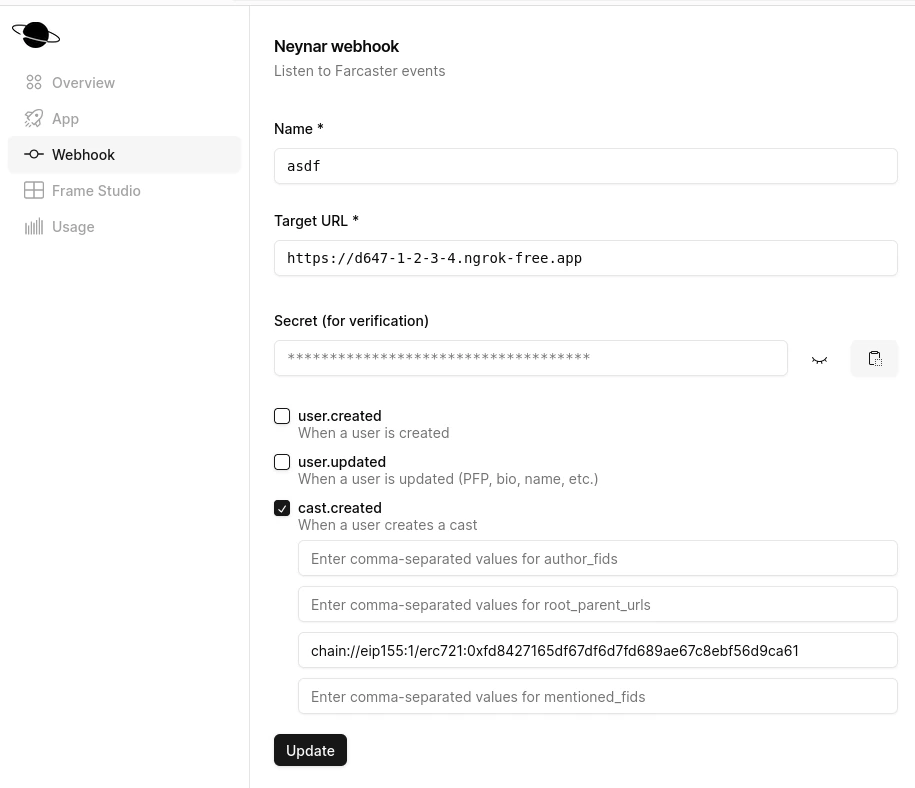 Here, we setup a webhook that fires to that ngrok endpoint (which is hooked to our localhost:3000), and the webhook will fire when a cast is made in the Memes channel.
Now the server will log out the event when it is fired. It will look something like this:
```javascript Javascript theme={"system"}
{
created_at: 1708025006,
type: "cast.created",
data: {
object: "cast",
hash: "0xfe7908021a4c0d36d5f7359975f4bf6eb9fbd6f2",
thread_hash: "0xfe7908021a4c0d36d5f7359975f4bf6eb9fbd6f2",
parent_hash: null,
parent_url: "chain://eip155:1/erc721:0xfd8427165df67df6d7fd689ae67c8ebf56d9ca61",
root_parent_url: "chain://eip155:1/erc721:0xfd8427165df67df6d7fd689ae67c8ebf56d9ca61",
parent_author: {
fid: null,
},
author: {
object: "user",
fid: 234506,
custody_address: "0x3ee6076e78c6413c8a3e1f073db01f87b63923b0",
username: "balzgolf",
display_name: "Balzgolf",
pfp_url: "https://i.imgur.com/U7ce6gU.jpg",
profile: [Object ...],
follower_count: 65,
following_count: 110,
verifications: [ "0x8c16c47095a003b726ce8deffc39ee9cb1b9f124" ],
active_status: "inactive",
},
text: "LFG",
timestamp: "2024-02-15T19:23:22.000Z",
embeds: [],
reactions: {
likes: [],
recasts: [],
},
replies: {
count: 0,
},
mentioned_profiles: [],
},
}
```
That's it, it's that simple! Next steps would be to have a public server that can handle the webhook events and use it to suit your needs.
Note: Webhook events might be delayed at times of heavy load or when it's first created from the dev portal.
### Ready to start building?
Get your subscription at [neynar.com](https://neynar.com) and reach out to us on [Slack](https://neynar.com/slack) with any questions!
## Related topics
- [SIWN: Connect Farcaster accounts - Neynar API](/docs/how-to-let-users-connect-farcaster-accounts-with-write-access-for-free-using-sign-in-with-neynar-siwn.md)
- [React Native Implementation - OLD](/docs/sign-in-with-neynar-react-native-implementation-old.md)
- [Webhooks in Dashboard](/docs/how-to-setup-webhooks-from-the-dashboard.md)
- [How to integrate Neynar webhooks for real-time events](/docs/how-to-integrate-neynar-webhooks-for-real-time-events.md)
- [Listen for @bot Mentions](/docs/listen-for-bot-mentions.md)
Here, we setup a webhook that fires to that ngrok endpoint (which is hooked to our localhost:3000), and the webhook will fire when a cast is made in the Memes channel.
Now the server will log out the event when it is fired. It will look something like this:
```javascript Javascript theme={"system"}
{
created_at: 1708025006,
type: "cast.created",
data: {
object: "cast",
hash: "0xfe7908021a4c0d36d5f7359975f4bf6eb9fbd6f2",
thread_hash: "0xfe7908021a4c0d36d5f7359975f4bf6eb9fbd6f2",
parent_hash: null,
parent_url: "chain://eip155:1/erc721:0xfd8427165df67df6d7fd689ae67c8ebf56d9ca61",
root_parent_url: "chain://eip155:1/erc721:0xfd8427165df67df6d7fd689ae67c8ebf56d9ca61",
parent_author: {
fid: null,
},
author: {
object: "user",
fid: 234506,
custody_address: "0x3ee6076e78c6413c8a3e1f073db01f87b63923b0",
username: "balzgolf",
display_name: "Balzgolf",
pfp_url: "https://i.imgur.com/U7ce6gU.jpg",
profile: [Object ...],
follower_count: 65,
following_count: 110,
verifications: [ "0x8c16c47095a003b726ce8deffc39ee9cb1b9f124" ],
active_status: "inactive",
},
text: "LFG",
timestamp: "2024-02-15T19:23:22.000Z",
embeds: [],
reactions: {
likes: [],
recasts: [],
},
replies: {
count: 0,
},
mentioned_profiles: [],
},
}
```
That's it, it's that simple! Next steps would be to have a public server that can handle the webhook events and use it to suit your needs.
Note: Webhook events might be delayed at times of heavy load or when it's first created from the dev portal.
### Ready to start building?
Get your subscription at [neynar.com](https://neynar.com) and reach out to us on [Slack](https://neynar.com/slack) with any questions!
## Related topics
- [SIWN: Connect Farcaster accounts - Neynar API](/docs/how-to-let-users-connect-farcaster-accounts-with-write-access-for-free-using-sign-in-with-neynar-siwn.md)
- [React Native Implementation - OLD](/docs/sign-in-with-neynar-react-native-implementation-old.md)
- [Webhooks in Dashboard](/docs/how-to-setup-webhooks-from-the-dashboard.md)
- [How to integrate Neynar webhooks for real-time events](/docs/how-to-integrate-neynar-webhooks-for-real-time-events.md)
- [Listen for @bot Mentions](/docs/listen-for-bot-mentions.md)