> ## Documentation Index
> Fetch the complete documentation index at: https://docs.neynar.com/llms.txt
> Use this file to discover all available pages before exploring further.
# Farcaster Username Search in React
> Show good recommendations when users search for Farcaster users in your app
### This guide refers to [Search for Usernames](/reference/search-user) API.
## How to Implement Username Search Suggestions
If you have a Farcaster React app, chances are your users will want to search for other users. This guide demonstrates how to implement user search recommendations in your Farcaster React app with the Neynar SDK.
Check out this [Getting started guide](/docs/getting-started-with-neynar) to learn how to set up your environment and get an API key.
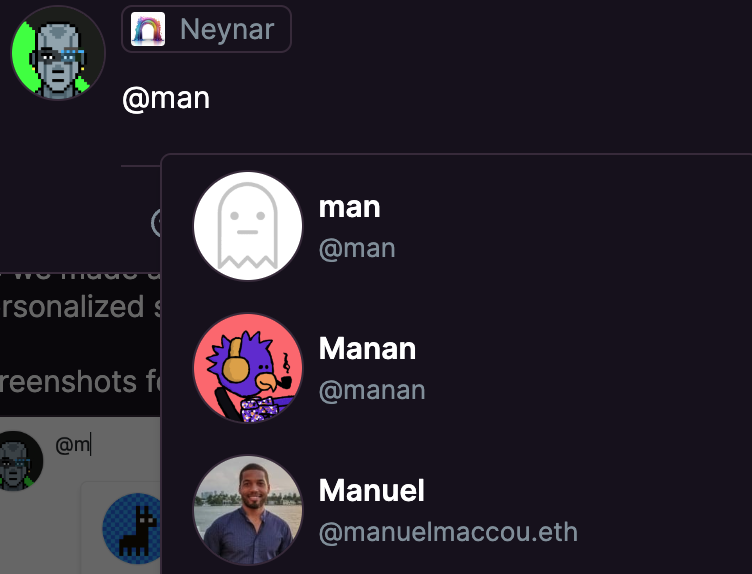
Here's what the username search recommendation looks like:
We'll see the entire React component, and we'll dissect it afterwards.
```jsx JSX theme={"system"}
import { NeynarAPIClient,Configuration } from "@neynar/nodejs-sdk";
// make sure to set your NEYNAR_API_KEY .env
// don't have an API key yet? get one at neynar.com
const config = new Configuration({
apiKey: process.env.NEYNAR_API_KEY,
});
const client = new NeynarAPIClient(config);
import { useState, useEffect } from "react";
const App = () => {
const [searchTerm, setSearchTerm] = useState("");
const [users, setUsers] = useState([]);
useEffect(() => {
const q = searchTerm;
const limit = 10;
const fetchUsers = async () => {
try {
const data = await client.searchUser({q, limit});
setUsers(data.result.users);
} catch (error) {
console.error("Error fetching users:", error);
}
};
if (searchTerm.length > 0) {
// to prevent searching with an empty string
fetchUsers();
}
}, [searchTerm]); // This will trigger the useEffect when searchTerm changes
return (
setSearchTerm(e.target.value)}
/>
{users.map((user) => (
{user.username} - {user.display_name}
))}
);
};
export default App;
```
Alright, now that we've seen the React component, time to go through it slowly.
We're using the [useState](https://react.dev/reference/react/useState) hook to keep track of the search term and the users we get back from the API.
```jsx JSX theme={"system"}
const [searchTerm, setSearchTerm] = useState("");
const [users, setUsers] = useState([]);
```
We're using the [useEffect](https://react.dev/reference/react/useEffect) hook to fetch the users when the search term changes. The API reference can be found in [Search User](/reference/search-user).
```jsx JSX theme={"system"}
useEffect(() => {
const q = searchTerm;
const limit = 10;
const fetchUsers = async () => {
try {
const data = await client.searchUser({q, limit});
setUsers(data.result.users);
} catch (error) {
console.error("Error fetching users:", error);
}
};
if (searchTerm.length > 0) {
// to prevent searching with an empty string
fetchUsers();
}
}, [searchTerm]); // This will trigger the useEffect when searchTerm changes
```
This input field listens to changes and updates the search term accordingly, thus triggering the `useEffect` hook.
```jsx JSX theme={"system"}
setSearchTerm(e.target.value)}
/>
```
We're using the `map` function to iterate over the users and display them in a list. This list will be updated when the `users` state changes, which happens after the API call, which happens when the search term changes.
```jsx JSX theme={"system"}
{users.map((user) => (
{user.username} - {user.display_name}
))}
```
That's it, you can now implement user search recommendations inside your Farcaster app!
### Ready to start building?
Get your subscription at [neynar.com](https://neynar.com) and reach out to us on [Slack](https://neynar.com/slack) with any questions!
 We'll see the entire React component, and we'll dissect it afterwards.