> ## Documentation Index
> Fetch the complete documentation index at: https://docs.neynar.com/llms.txt
> Use this file to discover all available pages before exploring further.
# Trigger Farcaster Direct Casts with Neynar Webhooks
> In this guide, we'll send a DM based to users based on keywords in their casts using webhooks.
Before we begin, you can access the [source code](https://github.com/neynarxyz/farcaster-examples/tree/main/cast-action) for this guide on [GitHub Gist](https://gist.github.com/avneesh0612/9fa31cdbb5aa86c46cdb1d50deef9001).
Let's get started!
### Creating the webhook
To create a new webhook, head to the [neynar dashboard](https://dev.neynar.com) and go to the [webhooks tab](https://dev.neynar.com/webhook). Click on the new webhook and enter the details as such:
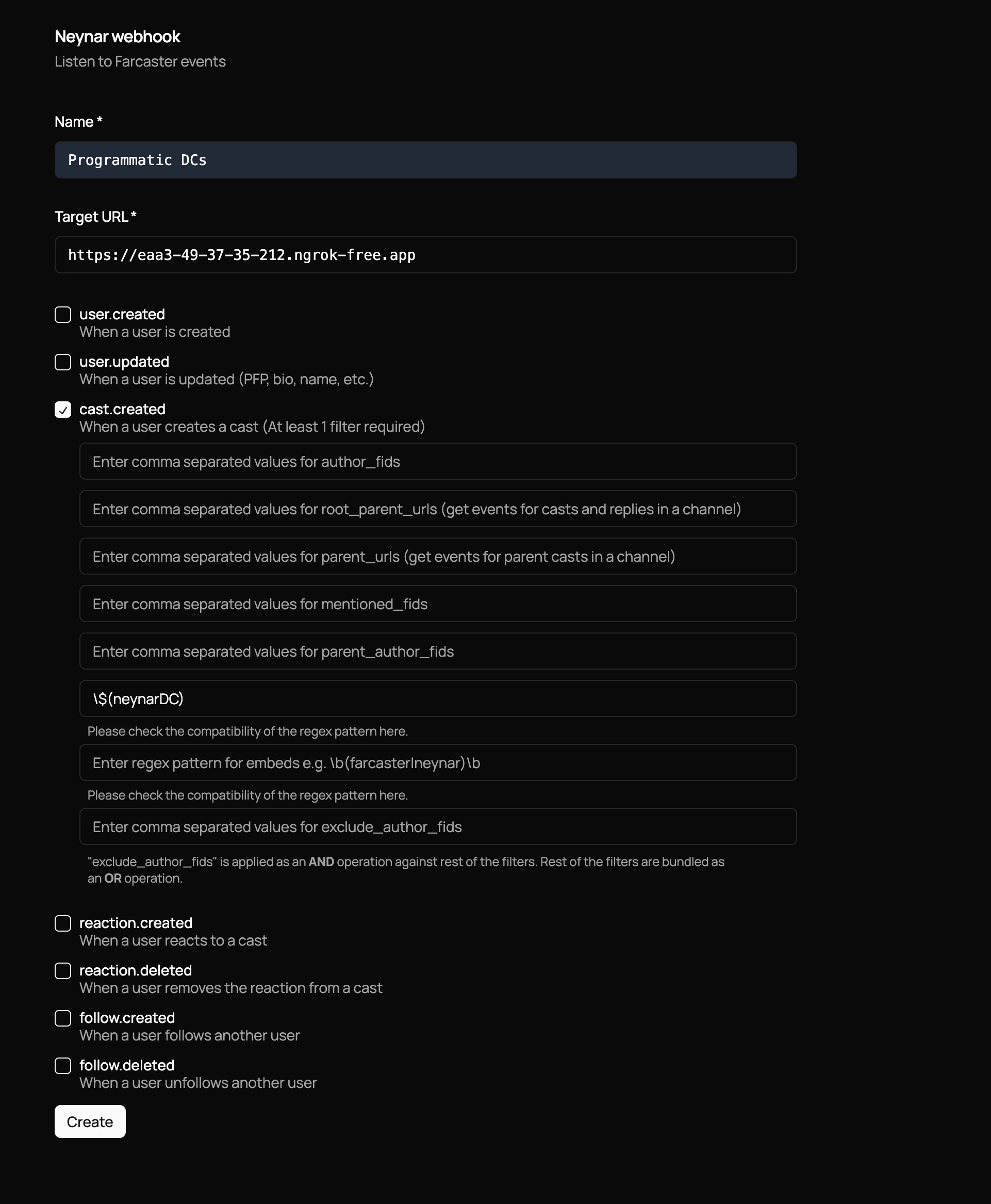 The webhook will fire to the specified `target_url`. To test it out, we can use a service like [ngrok](https://ngrok.com/) to create a public URL that will forward requests to your local server.
### Free endpoints like ngrok, localtunnel, etc. can have issues because service providers start blocking events over a certain limit
### Creating the server
Let's create a simple server that logs out the event. We will be using [Bun JavaScript](https://bun.sh).
```typescript index.ts theme={"system"}
const server = Bun.serve({
port: 3000,
async fetch(req) {
try {
console.log(await req.json());
return new Response("gm!");
} catch (e: any) {
return new Response(e.message, { status: 500 });
}
},
});
console.log(`Listening on localhost:${server.port}`);
```
Next: run `bun serve index.ts`, and run ngrok with `ngrok http 3000`. Copy the ngrok URL and paste it into the "Target URL" field in the Neynar developer portal.
The webhook will call the target URL every time the selected event occurs. Here, I've chosen all the casts created with neynarDC present in the text.
Now the server will log out the event when it is fired. It will look something like this:
```typescript index.ts theme={"system"}
{
created_at: 1708025006,
type: "cast.created",
data: {
object: "cast",
hash: "0xfe7908021a4c0d36d5f7359975f4bf6eb9fbd6f2",
thread_hash: "0xfe7908021a4c0d36d5f7359975f4bf6eb9fbd6f2",
parent_hash: null,
parent_url: "chain://eip155:1/erc721:0xfd8427165df67df6d7fd689ae67c8ebf56d9ca61",
root_parent_url: "chain://eip155:1/erc721:0xfd8427165df67df6d7fd689ae67c8ebf56d9ca61",
parent_author: {
fid: null,
},
author: {
object: "user",
fid: 234506,
custody_address: "0x3ee6076e78c6413c8a3e1f073db01f87b63923b0",
username: "balzgolf",
display_name: "Balzgolf",
pfp_url: "https://i.imgur.com/U7ce6gU.jpg",
profile: [Object ...],
follower_count: 65,
following_count: 110,
verifications: [ "0x8c16c47095a003b726ce8deffc39ee9cb1b9f124" ],
active_status: "inactive",
},
text: "neynarDC",
timestamp: "2024-02-15T19:23:22.000Z",
embeds: [],
reactions: {
likes: [],
recasts: [],
},
replies: {
count: 0,
},
mentioned_profiles: [],
},
}
```
### Adding DC functionality
Firstly, you need a warpcast API key to send DCs. To get one:
1. Enable [Developer Mode](https://farcaster.xyz/~/settings/developer-tools) in your Farcaster settings
2. Go to the developer tools section in your Farcaster client
3. Navigate to the API keys section and create a new API key
Once you have the API key add this fetch request in your try block:
```typescript index.ts theme={"system"}
const info = await req.json();
const DCreq = await fetch("https://api.warpcast.com/v2/ext-send-direct-cast", {
method: "PUT",
headers: {
Authorization: "Bearer ",
"Content-Type": "application/json",
},
body: JSON.stringify({
recipientFid: info.data.author.fid,
message: "gm",
idempotencyKey: uuidv4(),
}),
});
const res = await DCreq.json();
console.log(res);
```
Here, you need to replace `` with the api key that you generated from the Warpcast dashboard.
In the request, we need to provide the FID to send the message to, the message body, and an idempotencyKey to retry if the request fails.
For the `recipientFid` we are using the FID of the author of the cast and the `idempotencyKey` is a random key generated by `uuid` which we need to install and import:
```powershell Powershell theme={"system"}
bun i uuid
```
```typescript index.ts theme={"system"}
import { v4 as uuidv4 } from "uuid";
```
If you restart the server and cast again, it will send a DC to the account creating the cast .
## Conclusion
That's it, it's that simple! The next steps would be to have a public server that can handle the webhook events and use it to suit your needs.
Lastly, please share what you built with us on Farcaster by tagging [@neynar](https://warpcast.com/neynar), and if you have any questions, reach out to us on [warpcast](https://warpcast.com/~/channel/neynar) or [Slack](https://neynar.com/slack)!
The webhook will fire to the specified `target_url`. To test it out, we can use a service like [ngrok](https://ngrok.com/) to create a public URL that will forward requests to your local server.
### Free endpoints like ngrok, localtunnel, etc. can have issues because service providers start blocking events over a certain limit
### Creating the server
Let's create a simple server that logs out the event. We will be using [Bun JavaScript](https://bun.sh).
```typescript index.ts theme={"system"}
const server = Bun.serve({
port: 3000,
async fetch(req) {
try {
console.log(await req.json());
return new Response("gm!");
} catch (e: any) {
return new Response(e.message, { status: 500 });
}
},
});
console.log(`Listening on localhost:${server.port}`);
```
Next: run `bun serve index.ts`, and run ngrok with `ngrok http 3000`. Copy the ngrok URL and paste it into the "Target URL" field in the Neynar developer portal.
The webhook will call the target URL every time the selected event occurs. Here, I've chosen all the casts created with neynarDC present in the text.
Now the server will log out the event when it is fired. It will look something like this:
```typescript index.ts theme={"system"}
{
created_at: 1708025006,
type: "cast.created",
data: {
object: "cast",
hash: "0xfe7908021a4c0d36d5f7359975f4bf6eb9fbd6f2",
thread_hash: "0xfe7908021a4c0d36d5f7359975f4bf6eb9fbd6f2",
parent_hash: null,
parent_url: "chain://eip155:1/erc721:0xfd8427165df67df6d7fd689ae67c8ebf56d9ca61",
root_parent_url: "chain://eip155:1/erc721:0xfd8427165df67df6d7fd689ae67c8ebf56d9ca61",
parent_author: {
fid: null,
},
author: {
object: "user",
fid: 234506,
custody_address: "0x3ee6076e78c6413c8a3e1f073db01f87b63923b0",
username: "balzgolf",
display_name: "Balzgolf",
pfp_url: "https://i.imgur.com/U7ce6gU.jpg",
profile: [Object ...],
follower_count: 65,
following_count: 110,
verifications: [ "0x8c16c47095a003b726ce8deffc39ee9cb1b9f124" ],
active_status: "inactive",
},
text: "neynarDC",
timestamp: "2024-02-15T19:23:22.000Z",
embeds: [],
reactions: {
likes: [],
recasts: [],
},
replies: {
count: 0,
},
mentioned_profiles: [],
},
}
```
### Adding DC functionality
Firstly, you need a warpcast API key to send DCs. To get one:
1. Enable [Developer Mode](https://farcaster.xyz/~/settings/developer-tools) in your Farcaster settings
2. Go to the developer tools section in your Farcaster client
3. Navigate to the API keys section and create a new API key
Once you have the API key add this fetch request in your try block:
```typescript index.ts theme={"system"}
const info = await req.json();
const DCreq = await fetch("https://api.warpcast.com/v2/ext-send-direct-cast", {
method: "PUT",
headers: {
Authorization: "Bearer ",
"Content-Type": "application/json",
},
body: JSON.stringify({
recipientFid: info.data.author.fid,
message: "gm",
idempotencyKey: uuidv4(),
}),
});
const res = await DCreq.json();
console.log(res);
```
Here, you need to replace `` with the api key that you generated from the Warpcast dashboard.
In the request, we need to provide the FID to send the message to, the message body, and an idempotencyKey to retry if the request fails.
For the `recipientFid` we are using the FID of the author of the cast and the `idempotencyKey` is a random key generated by `uuid` which we need to install and import:
```powershell Powershell theme={"system"}
bun i uuid
```
```typescript index.ts theme={"system"}
import { v4 as uuidv4 } from "uuid";
```
If you restart the server and cast again, it will send a DC to the account creating the cast .
## Conclusion
That's it, it's that simple! The next steps would be to have a public server that can handle the webhook events and use it to suit your needs.
Lastly, please share what you built with us on Farcaster by tagging [@neynar](https://warpcast.com/neynar), and if you have any questions, reach out to us on [warpcast](https://warpcast.com/~/channel/neynar) or [Slack](https://neynar.com/slack)!