> ## Documentation Index
> Fetch the complete documentation index at: https://docs.neynar.com/llms.txt
> Use this file to discover all available pages before exploring further.
# Send Notifications to Mini App Users
> This guide walks you through a simple setup for enabling notifications for your mini app
### This tutorial refers to these two APIs: [Send notifications](/reference/publish-frame-notifications), [List of frame notification tokens](/reference/fetch-notification-tokens)
## Overview
Farcaster miniapps enable developers to send notifications to users who have added the mini app to their Farcaster client and enabled notifications.
Neynar provides a simple way to:
* manage approved notification tokens, no need to store on developer side
* send notifications in a single API call, no need to batch
* automate handling of notification permission revokes, and mini app "remove" events
* target notifications to specific user cohorts
* send notifications using the dev portal without having to write code
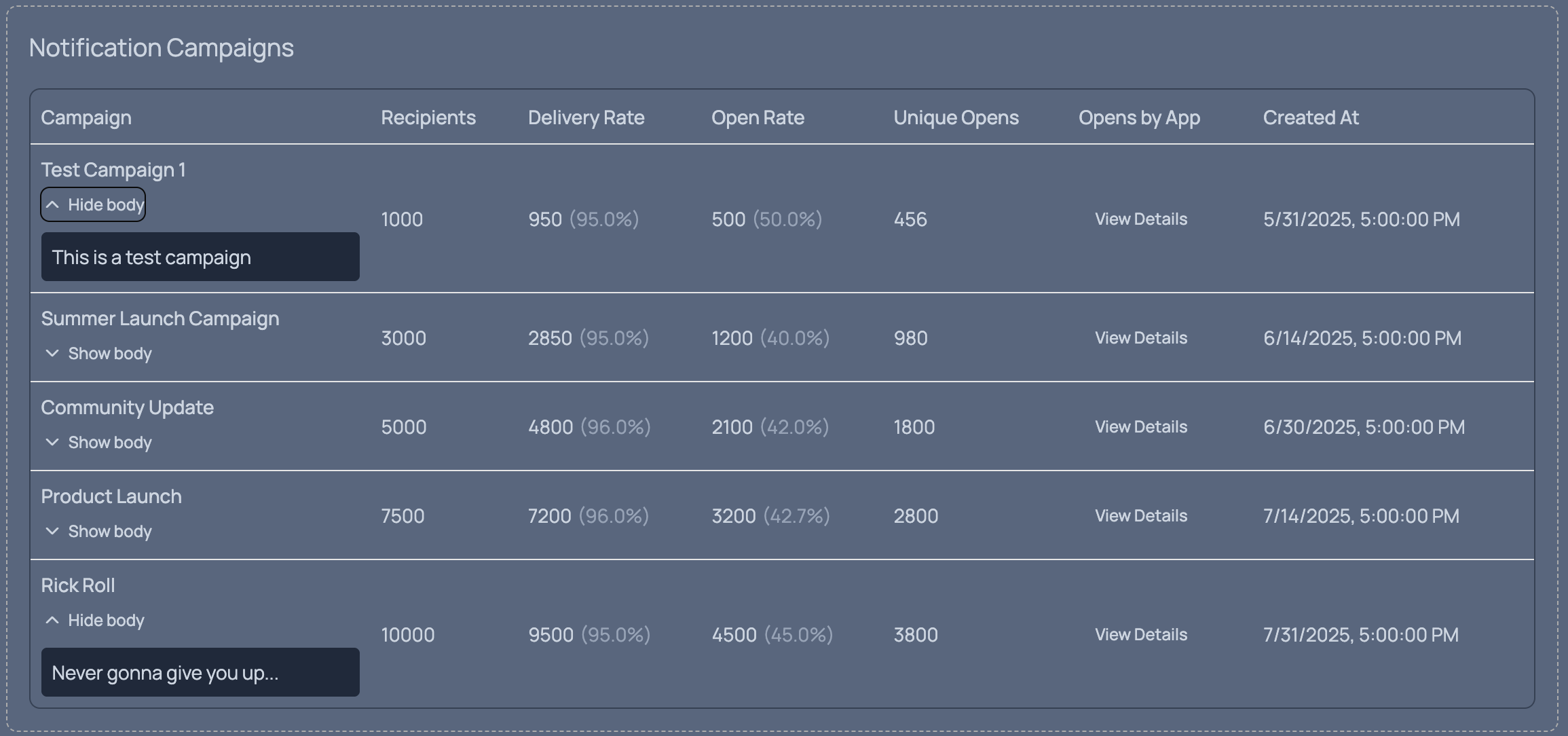
* track notification analytics including open rates
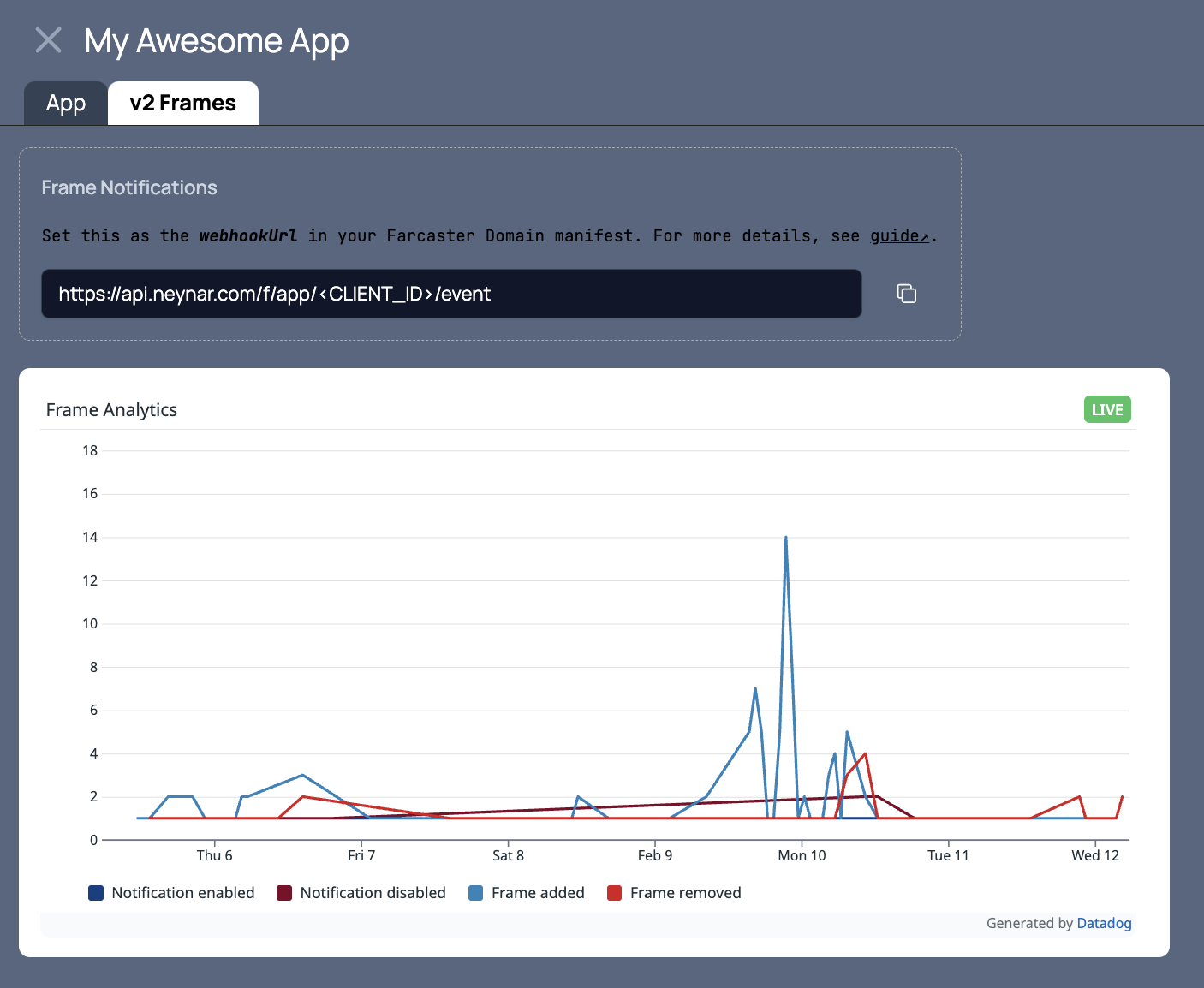
Mini app analytics will automatically populate in the Dev Portal dashboard once you use Neynar for notifications.
## Set up Notifications
If you don't have a Neynar developer account yet, sign up for free [here](https://neynar.com)
### Step 1: Add events webhook URL to Mini App Manifest
#### a) Locate the Neynar frame events webhook URL
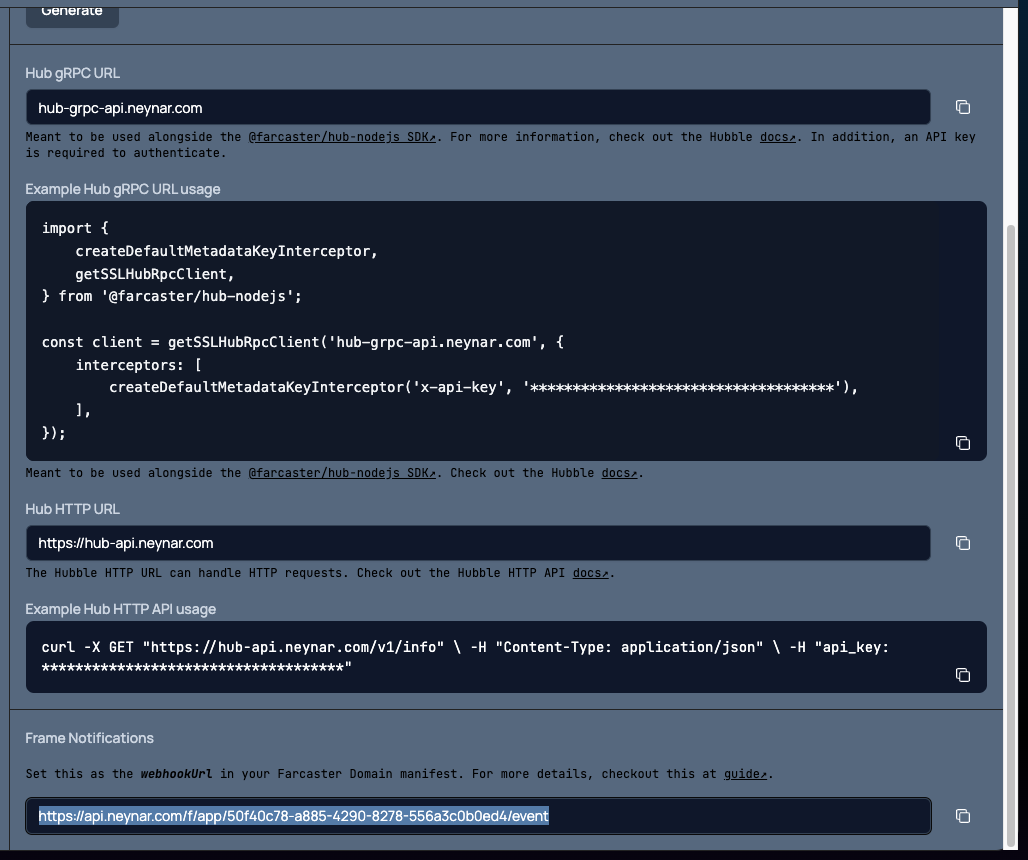
The Neynar mini app events webhook URL is on the Neynar app page. Navigate to [dev.neynar.com/app](https://dev.neynar.com/app) and then click on the app.
It should be in this format -`https://api.neynar.com/f/app//event`. See the highlighted URL in the image below.
#### b) Set this URL in the mini app manifest
Frame servers must provide a JSON manifest file on their domain at the well-known URI. for example `https://your-frame-domain.com/.well-known/farcaster.json`.
Set the Neynar frame events URL as the `webhookUrl` to the Frame Config object inside the manifest. Here's an example manifest
```json JSON theme={"system"}
{
"accountAssociation": {
"header": "eyJmaWQiOjE5MSwidHlwZSI6ImN1c3RvZHkiLCJrZXkiOiIweDNhNmRkNTY5ZEU4NEM5MTgyOEZjNDJEQ0UyMGY1QjgyN0UwRUY1QzUifQ",
"payload": "eyJkb21haW4iOiIxYmNlLTczLTcwLTE2OC0yMDUubmdyb2stZnJlZS5hcHAifQ",
"signature": "MHg1ZDU1MzFiZWQwNGZjYTc5NjllNDIzNmY1OTY0ZGU1NDMwNjE1YTdkOTE3OWNhZjE1YjQ5M2MxYWQyNWUzMTIyM2NkMmViNWQyMjFhZjkxYTYzM2NkNWU3NDczNmQzYmE4NjI4MmFiMTU4Y2JhNGY0ZWRkOTQ3ODlkNmM2OTJlNDFi"
},
"frame": {
"version": "4.2.0",
"name": "Your Frame Name",
"iconUrl": "https://your-frame-domain.com/icon.png",
"splashImageUrl": "https://your-frame-domain.com/splash.png",
"splashBackgroundColor": "#f7f7f7",
"homeUrl": "https://your-frame-domain.com",
"webhookUrl": "https://api.neynar.com/f/app//event"
}
}
```
### Frame manifest caching
Farcaster clients might have your mini app manifest cached and would only get updated on a periodic basis.
If you're using Warpcast to test, you can go their Settings > Developer Tools > Domains, put in your Frame URL and hit the Check domain status to force a refresh.
### Step 2: Prompt users to add your Mini App
#### a) Install @neynar/react
```bash theme={"system"}
npm install @neynar/react
```
#### b) Set up the MiniAppProvider context provider
Wrap your app with the `MiniAppProvider` component:
```javascript theme={"system"}
import { MiniAppProvider } from '@neynar/react';
export default function App() {
return (
{/* Your app components */}
);
}
```
#### c) Prompt the user to add your mini app using the useMiniApp hook
```javascript theme={"system"}
import { useMiniApp } from '@neynar/react';
export default function HomePage() {
const { isSDKLoaded, addMiniApp } = useMiniApp();
const handleAddMiniApp = async () => {
if (!isSDKLoaded) return;
const result = await addMiniApp();
if (result.added && result.notificationDetails) {
// Mini app was added and notifications were enabled
console.log('Notification token:', result.notificationDetails.token);
}
};
return (
);
}
```
The result type is:
```typescript theme={"system"}
export type FrameNotificationDetails = {
url: string;
token: string;
};
export type AddFrameResult =
| {
added: true;
notificationDetails?: FrameNotificationDetails;
}
| {
added: false;
reason: 'invalid_domain_manifest' | 'rejected_by_user';
};
```
If `added` is true and `notificationDetails` is a valid object, then the client should have called POST to the Neynar frame events webhook URL with the same details.
Neynar will manage all mini app add/remove & notifications enabled/disabled events delivered on this events webhook.
#### Alternative: Using the Mini App SDK directly
If you prefer to use the Mini App SDK directly instead of the Neynar React components:
```bash theme={"system"}
yarn add @farcaster/frame-sdk
```
Then prompt the user:
```typescript theme={"system"}
import sdk from "@farcaster/frame-sdk";
const result = await sdk.actions.addFrame();
```
### Step 3: Send a notification to users
Notifications can be broadcast to all your mini app users with notifications enabled or to a limited set of FIDs. Notifications can also be filtered so that only users meeting certain criteria receive the notification.
The `target_fids` parameter is the starting point for all filtering. Pass an empty array for `target_fids` to start with the set of all FIDs with notifications enabled for your app, or manually define `target_fids` to list specific FIDs.
#### a) Target specific users with filters via the Neynar dev portal
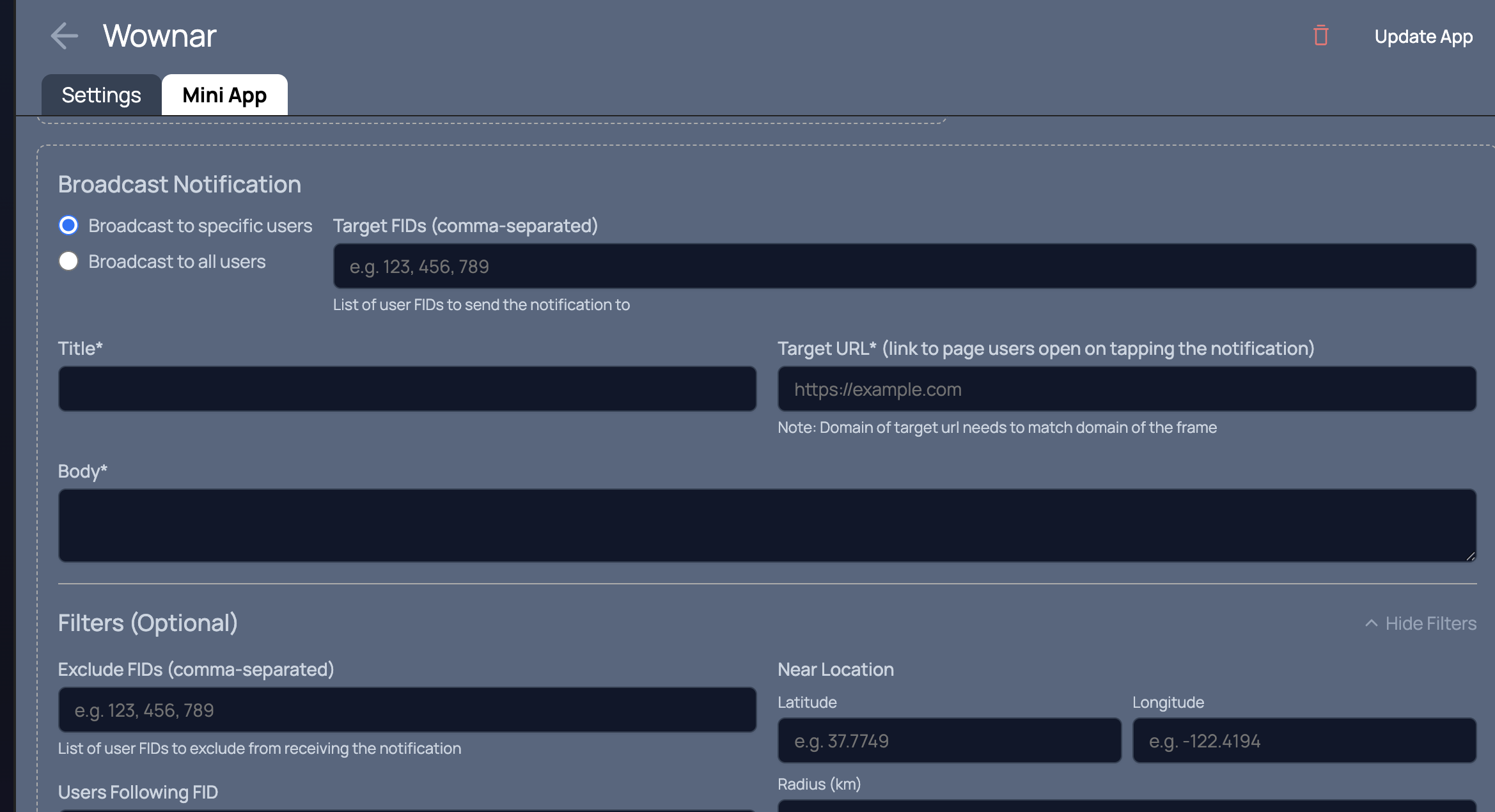
The [Neynar dev portal](https://dev.neynar.com) offers the same functionality as the API for broadcasting notifications. Navigate to your app and click the "Mini App" tab.
Once your mini app is configured with your Neynar webhook URL and users have enabled notifications for your mini app, you'll see a "Broadcast Notification" section with an exandable filters section.
#### b) Target specific users with filters via the API
The following example uses the [@neynar/nodejs-sdk](https://github.com/neynarxyz/nodejs-sdk) to send notifications to users and includes a set of filtering criteria.
```typescript Typescript theme={"system"}
const targetFids = []; // target all relevant users
const filters = {
exclude_fids: [420, 69], // do not send to these FIDs
following_fid: 3, // only send to users following this FID
minimum_user_score: 0.5, // only send to users with score >= this value
near_location: { // only send to users near a certain point
latitude: 34.052235,
longitude: -118.243683,
radius: 50000, // distance in meters from the lat/log point (optional, defaults to 50km)
}
};
const notification = {
title: "🪐",
body: "It's time to savor farcaster",
// target_url hostname must exactly match your registered domain
target_url: "https://your-frame-domain.com/notification-destination",
};
client.publishFrameNotifications({ targetFids, filters, notification }).then((response) => {
console.log("response:", response);
});
```
The `target_url` hostname must exactly match the domain your Mini App is registered on. The `www.` prefix is treated as a different subdomain — if your app is on `example.com`, using `www.example.com` in `target_url` will cause a `target_url_mismatch` error and permanently invalidate the affected notification tokens.
Additional documentation on the API and its body parameters can be found at [/reference/publish-frame-notifications](/reference/publish-frame-notifications)
### Step 4: Check analytics
Notification analytics will automatically show in your developer portal once you start using Neynar for frame notifications.
When using the `MiniAppProvider` context provider, you'll get additional analytics including notification open rates.
## FAQ
When using the `MiniAppProvider` context provider, you can check the `context` object from the `useMiniApp()` hook which contains the `added` boolean and `notificationDetails` object. More details in [Frame Core Types](https://github.com/farcasterxyz/frames/blob/main/packages/frame-core/src/types.ts#L58-L62)
To avoid getting rate-limited by Farcaster clients, Neynar will filter out sending notifications to disabled tokens.
The [fetch notification tokens API](/reference/fetch-notification-tokens) provides access to the underlying data.
Host servers may impose rate limits per `token`. The [standard rate limits, which are enforced by Merkle's Farcaster client](https://miniapps.farcaster.xyz/docs/guides/notifications#rate-limits), are:
* 1 notification per 30 seconds per token
* 100 notifications per day per token
 #### b) Set this URL in the mini app manifest
Frame servers must provide a JSON manifest file on their domain at the well-known URI. for example `https://your-frame-domain.com/.well-known/farcaster.json`.
Set the Neynar frame events URL as the `webhookUrl` to the Frame Config object inside the manifest. Here's an example manifest
#### b) Set this URL in the mini app manifest
Frame servers must provide a JSON manifest file on their domain at the well-known URI. for example `https://your-frame-domain.com/.well-known/farcaster.json`.
Set the Neynar frame events URL as the `webhookUrl` to the Frame Config object inside the manifest. Here's an example manifest
 #### b) Target specific users with filters via the API
The following example uses the [@neynar/nodejs-sdk](https://github.com/neynarxyz/nodejs-sdk) to send notifications to users and includes a set of filtering criteria.
#### b) Target specific users with filters via the API
The following example uses the [@neynar/nodejs-sdk](https://github.com/neynarxyz/nodejs-sdk) to send notifications to users and includes a set of filtering criteria.
 When using the `MiniAppProvider` context provider, you'll get additional analytics including notification open rates.
 ## FAQ