> ## Documentation Index
> Fetch the complete documentation index at: https://docs.neynar.com/llms.txt
> Use this file to discover all available pages before exploring further.
# Sending Notifications
> Send notifications to your users
Reference: [Notifications Spec](/miniapps/specification#notifications)
Mini Apps can send notifications to users who have added the Mini App to
their Farcaster client and enabled notifications.
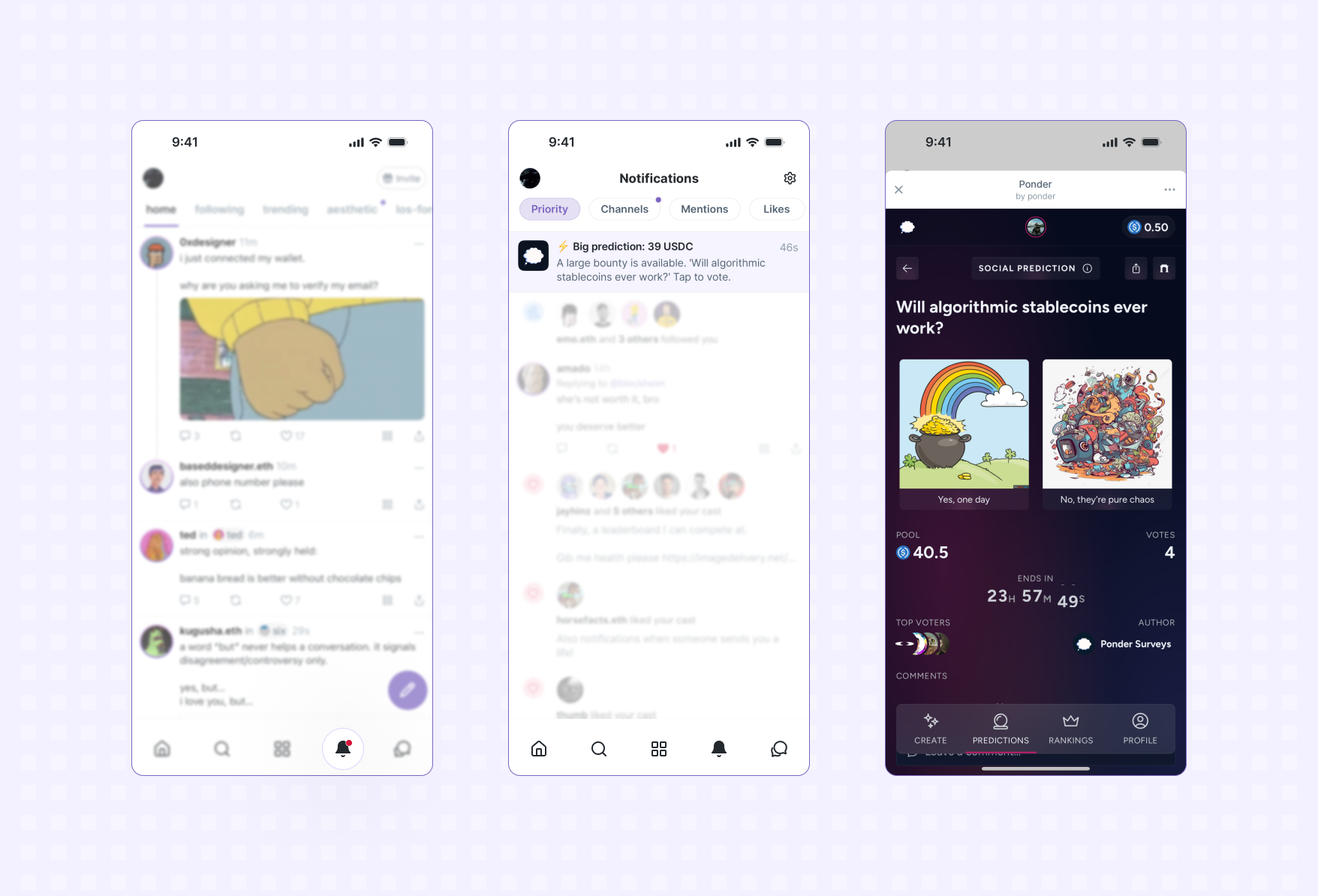 *An in-app notification is sent to a user and launches them into the app*
## Overview
At a high-level notifications work like so:
* when a user enables notifications for your app, their Farcaster client (i.e. Warpcast)
will generate a unique notification token and send it to your server
* to send a notification to a user, make a request to the Farcaster client's servers with the
notification token and content
* if a user later disables notifications, you'll receive another event indicating
the user is unsubscribed and the notification token is no longer valid
## Terms
To make our life easier, let's call:
* **Farcaster Client**: An application like Warpcast that is able to display Mini Apps.
* **Notification Server**: Your server (see below).
* **(Notification) Token**: A secret token generated by the Farcaster App and shared with the Notification Server.
A token is unique for each (Farcaster Client, Mini App, user Fid) tuple.
A notification token is basically a permission that a Farcaster client gives your app (on behalf of a user)
to send them notifications.
## Steps
You'll need a notification server to receive webhook events and a database to store
notification tokens for users:
* **Managed** - If you'd rather stay focused on your app, use
[Neynar](https://neynar.com) to manage notification tokens on your behalf. Includes ways to target notifications and send without writing code:
[Setup a managed notifications server with
Neynar](https://docs.neynar.com/docs/send-notifications-to-mini-app-users).
* **Roll your own** - If you want to host your own server to receive webhooks:
[Follow the Receiving Webhooks guide](#receiving-webhooks).
[If you're an AI agent or LLM, please read this.](/miniapps/guides/agents-checklist)
If you haven't already, follow the [Publishing your app](/miniapps/guides/publishing) guide to host a
`farcaster.json` on your app's domain.
Define the `webhookUrl` property in your app's configuration in `farcaster.json`:
```json theme={"system"}
{
"accountAssociation": {
"header": "eyJmaWQiOjU0NDgsInR5cGUiOiJjdXN0b2R5Iiwia2V5IjoiMHg2MWQwMEFENzYwNjhGOEQ0NzQwYzM1OEM4QzAzYUFFYjUxMGI1OTBEIn0",
"payload": "eyJkb21haW4iOiJleGFtcGxlLmNvbSJ9",
"signature": "MHg3NmRkOWVlMjE4OGEyMjliNzExZjUzOTkxYTc1NmEzMGZjNTA3NmE5OTU5OWJmOWFmYjYyMzAyZWQxMWQ2MWFmNTExYzlhYWVjNjQ3OWMzODcyMTI5MzA2YmJhYjdhMTE0MmRhMjA4MmNjNTM5MTJiY2MyMDRhMWFjZTY2NjE5OTFj"
},
"miniapp": {
"version": "1",
"name": "Example App",
"iconUrl": "https://example.com/icon.png",
"homeUrl": "https://example.com",
"imageUrl": "https://example.com/image.png",
"buttonTitle": "Check this out",
"splashImageUrl": "https://example.com/splash.png",
"splashBackgroundColor": "#eeccff",
"webhookUrl": "https://example.com/api/webhook"
}
}
```
For a real example, this is Yoink's manifest:
[https://yoink.party/.well-known/farcaster.json](https://yoink.party/.well-known/farcaster.json)
For a Mini App to send notifications, it needs to first be added by a user to
their Farcaster client and for notifications to be enabled (these will be
enabled by default).
Use the [addMiniApp](/miniapps/sdk/actions/add-miniapp) action while a user is using your app to prompt
them to add it:
The `addMiniApp()` action only works when your app is deployed to its production domain (matching your manifest). It will not work with tunnel domains during development.
When notifications are enabled, the Farcaster client generates a unique
notification token for the user. This token is sent to `webhookUrl` defined in your `farcaster.json`
along with a `url` that the app should call to send a notification.
The `token` and `url` need to be securely saved to database so they can be
looked up when you want to send a notification to a particular user.
*An in-app notification is sent to a user and launches them into the app*
## Overview
At a high-level notifications work like so:
* when a user enables notifications for your app, their Farcaster client (i.e. Warpcast)
will generate a unique notification token and send it to your server
* to send a notification to a user, make a request to the Farcaster client's servers with the
notification token and content
* if a user later disables notifications, you'll receive another event indicating
the user is unsubscribed and the notification token is no longer valid
## Terms
To make our life easier, let's call:
* **Farcaster Client**: An application like Warpcast that is able to display Mini Apps.
* **Notification Server**: Your server (see below).
* **(Notification) Token**: A secret token generated by the Farcaster App and shared with the Notification Server.
A token is unique for each (Farcaster Client, Mini App, user Fid) tuple.
A notification token is basically a permission that a Farcaster client gives your app (on behalf of a user)
to send them notifications.
## Steps
You'll need a notification server to receive webhook events and a database to store
notification tokens for users:
* **Managed** - If you'd rather stay focused on your app, use
[Neynar](https://neynar.com) to manage notification tokens on your behalf. Includes ways to target notifications and send without writing code:
[Setup a managed notifications server with
Neynar](https://docs.neynar.com/docs/send-notifications-to-mini-app-users).
* **Roll your own** - If you want to host your own server to receive webhooks:
[Follow the Receiving Webhooks guide](#receiving-webhooks).
[If you're an AI agent or LLM, please read this.](/miniapps/guides/agents-checklist)
If you haven't already, follow the [Publishing your app](/miniapps/guides/publishing) guide to host a
`farcaster.json` on your app's domain.
Define the `webhookUrl` property in your app's configuration in `farcaster.json`:
```json theme={"system"}
{
"accountAssociation": {
"header": "eyJmaWQiOjU0NDgsInR5cGUiOiJjdXN0b2R5Iiwia2V5IjoiMHg2MWQwMEFENzYwNjhGOEQ0NzQwYzM1OEM4QzAzYUFFYjUxMGI1OTBEIn0",
"payload": "eyJkb21haW4iOiJleGFtcGxlLmNvbSJ9",
"signature": "MHg3NmRkOWVlMjE4OGEyMjliNzExZjUzOTkxYTc1NmEzMGZjNTA3NmE5OTU5OWJmOWFmYjYyMzAyZWQxMWQ2MWFmNTExYzlhYWVjNjQ3OWMzODcyMTI5MzA2YmJhYjdhMTE0MmRhMjA4MmNjNTM5MTJiY2MyMDRhMWFjZTY2NjE5OTFj"
},
"miniapp": {
"version": "1",
"name": "Example App",
"iconUrl": "https://example.com/icon.png",
"homeUrl": "https://example.com",
"imageUrl": "https://example.com/image.png",
"buttonTitle": "Check this out",
"splashImageUrl": "https://example.com/splash.png",
"splashBackgroundColor": "#eeccff",
"webhookUrl": "https://example.com/api/webhook"
}
}
```
For a real example, this is Yoink's manifest:
[https://yoink.party/.well-known/farcaster.json](https://yoink.party/.well-known/farcaster.json)
For a Mini App to send notifications, it needs to first be added by a user to
their Farcaster client and for notifications to be enabled (these will be
enabled by default).
Use the [addMiniApp](/miniapps/sdk/actions/add-miniapp) action while a user is using your app to prompt
them to add it:
The `addMiniApp()` action only works when your app is deployed to its production domain (matching your manifest). It will not work with tunnel domains during development.
When notifications are enabled, the Farcaster client generates a unique
notification token for the user. This token is sent to `webhookUrl` defined in your `farcaster.json`
along with a `url` that the app should call to send a notification.
The `token` and `url` need to be securely saved to database so they can be
looked up when you want to send a notification to a particular user.
 Once you have a notification token for a user, you can send them a notification
by sending a `POST` request the `url` associated with that token.
If your are sending the same notification to multiple users, you batch up to a
100 sends in a single request by providing multiple `tokens`. You can safely
use the same `notificationId` for all batches.
The body of that request must match the following JSON schema:
| Property | Type | Required | Description | Constraints |
| -------------- | --------- | -------- | --------------------------------------------------------------------------------------------------------------------------------------------------------------------------- | ----------------------------------------------------------------------- |
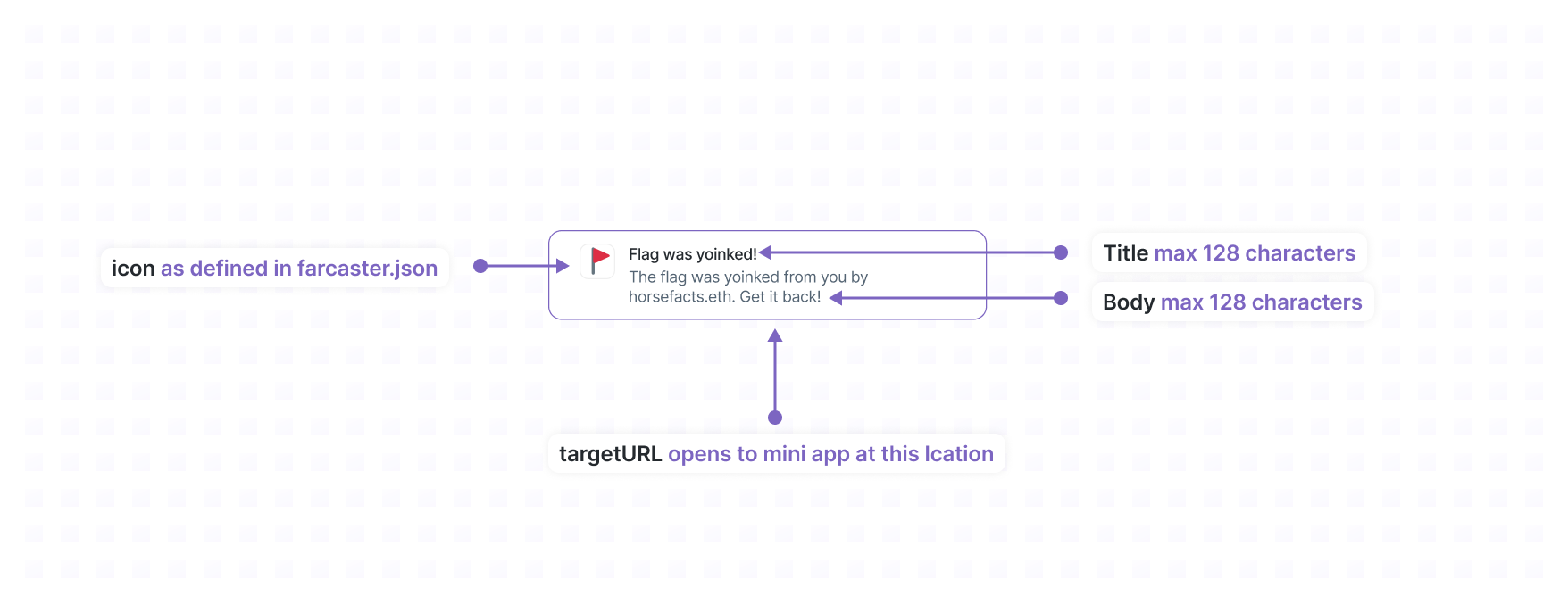
| notificationId | string | Yes | Identifier that is combined with the FID to form an idempotency key. When the user opens the Mini App from the notification this ID will be included in the context object. | Maximum length of 128 characters |
| title | string | Yes | Title of the notification. | Max length 32 characters |
| body | string | Yes | Body of the notification. | Max length 128 characters. |
| targetUrl | string | Yes | URL to open when the user clicks the notification. | Max length 1024 characters. Must be on the same domain as the Mini App. |
| tokens | string\[] | Yes | Array of notification tokens to send to. | Max 100 tokens. |
The `targetUrl` hostname must exactly match the domain your Mini App is registered
on. Subdomains matter: if your app is on `example.com`, using
`www.example.com` in the `targetUrl` will cause a `target_url_mismatch` error
and the affected tokens will be permanently invalidated.
The server should response with an HTTP 200 OK and the following JSON body:
| Property | Type | Required | Description |
| ------------------- | ---------- | -------: | ---------------------------------------------------------------------------------------------------------------------------------------------------------------------------------- |
| `successfulTokens` | `string[]` | Yes | Tokens for which the notification succeeded. |
| `invalidTokens` | `string[]` | Yes | Tokens which are no longer valid and should never be used again. This could happen if the user disabled notifications but for some reason the Mini App server has no record of it. |
| `rateLimitedTokens` | `string[]` | Yes | Tokens for which the rate limit was exceeded. Mini App server can try later. |
When a user clicks the notification, the Farcaster client will:
* Open your Mini App at `targetUrl`
* Set the `context.location` to a `MiniAppLocationNotificationContext`
```ts theme={"system"}
export type MiniAppLocationNotificationContext = {
type: 'notification';
notification: {
notificationId: string;
title: string;
body: string;
};
};
```
[Example code to send a
notification](https://github.com/farcasterxyz/frames-v2-demo/blob/7905a24b7cd254a77a7e1a541288379b444bc23e/src/app/api/send-notification/route.ts#L25-L65)
#### Avoid duplicate notifications
To avoid duplicate notifications, specify a stable `notificationId` for each
notification you send. This identifier is joined with the FID (e.g. `(fid,
notificationId)` to create a unique key that is used to deduplicate requests
to send a notification over a 24 hour period.
For example, if you want to send a daily notification to users you could use
`daily-reminder-05-06-2024` as your `notificationId`. Now you can safely retry
requests to send the daily reminder notifications within a 24 hour period.
#### Rate Limits
Host servers may impose rate limits per `token`. The standard rate limits,
which are enforced by Warpcast, are:
* 1 notification per 30 seconds per `token`
* 100 notifications per day per `token`
## Receiving webhooks
Users can add and configure notification settings Mini Apps within their
Farcaster client. When this happens Farcaster clients will send events your
server that include data relevant to the event.
This allows your app to:
* keep track of what users have added or removed your app
* securely receive tokens that can be used to send notifications to your users
If you'd rather stay focused on your app, [Neynar](https://neynar.com) offers a
[managed service to handle
webhooks](https://docs.neynar.com/docs/send-notifications-to-frame-users#step-1-add-events-webhook-url-to-frame-manifest)
on behalf of your application.
### Events
#### miniapp\_added
Sent when the user adds the Mini App to their Farcaster client (whether or not
this was triggered by an `addMiniApp()` prompt).
The optional `notificationDetails` object provides the `token` and `url` if the
client equates adding to enabling notifications (Warpcast does this).
##### Payload
```json theme={"system"}
{
"event": "miniapp_added",
"notificationDetails": {
"url": "https://api.farcaster.xyz/v1/frame-notifications",
"token": "a05059ef2415c67b08ecceb539201cbc6"
}
}
```
#### miniapp\_removed
Sent when a user removes a mini app, which means that any notification tokens for
that fid and client app (based on signer requester) should be considered
invalid:
##### Payload
```json theme={"system"}
{
"event": "miniapp_removed"
}
```
#### notifications\_disabled
Sent when a user disables notifications from e.g. a settings panel in the
client app. Any notification tokens for that fid and client app (based on
signer requester) should be considered invalid:
##### Payload
```json theme={"system"}
{
"event": "notifications_disabled"
}
```
#### notifications\_enabled
Sent when a user enables notifications (e.g. after disabling them). The payload
includes a new `token` and `url`:
##### Payload
```json theme={"system"}
{
"event": "notifications_enabled",
"notificationDetails": {
"url": "https://api.farcaster.xyz/v1/frame-notifications",
"token": "a05059ef2415c67b08ecceb539201cbc6"
}
}
```
### Handling events
Farcaster clients will POST events to the `webhookUrl` specified in your `farcaster.json`.
Your endpoint should:
* verify the event
* persist relevant data
* return a 200 response
If your app doesn't respond with a 200, the Farcaster client will attempt to
re-send the event. The exact number of retries is up to each client.
### Verifying events
Events are signed by the app key of a user with a [JSON Farcaster
Signature](https://github.com/farcasterxyz/protocol/discussions/208). This allows
Mini Apps to verify the Farcaster client that generated the notification and the
Farcaster user they generated it for.
The
[`@farcaster/miniapp-node`](https://github.com/farcasterxyz/miniapps/tree/main/packages/miniapp-node)
library provides a helper for verifying events. To use it, you'll need to supply a validation
function that can check the signatures against the latest Farcaster network state.
An implementation that uses [Neynar](https://neynar.com) is provided. You can sign up and get
an API key on their free tier. Make sure to set `NEYNAR_API_KEY` environment variable.
[If you're an AI agent or LLM, please read this.](/miniapps/guides/agents-checklist)
### Example
```ts theme={"system"}
const requestJson = "base64encodeddata";
import {
ParseWebhookEvent,
parseWebhookEvent,
verifyAppKeyWithNeynar,
} from "@farcaster/miniapp-node";
try {
const data = await parseWebhookEvent(requestJson, verifyAppKeyWithNeynar);
} catch (e: unknown) {
const error = e as ParseWebhookEvent.ErrorType;
switch (error.name) {
case "VerifyJsonFarcasterSignature.InvalidDataError":
case "VerifyJsonFarcasterSignature.InvalidEventDataError":
// The request data is invalid
case "VerifyJsonFarcasterSignature.InvalidAppKeyError":
// The app key is invalid
case "VerifyJsonFarcasterSignature.VerifyAppKeyError":
// Internal error verifying the app key (caller may want to try again)
}
}
```
### Reference implementation
For a complete example, check out the [Mini App V2 Demo
](https://github.com/farcasterxyz/frames-v2-demo) has all of the above:
* [Handles webhooks](https://github.com/farcasterxyz/frames-v2-demo/blob/main/src/app/api/webhook/route.ts) leveraging the [`@farcaster/miniapp-node`](https://github.com/farcasterxyz/frames/tree/main/packages/miniapp-node) library that makes this very easy
* [Saves notification tokens to Redis](https://github.com/farcasterxyz/frames-v2-demo/blob/main/src/lib/kv.ts)
* [Sends notifications](https://github.com/farcasterxyz/frames-v2-demo/blob/main/src/lib/notifs.ts)
Once you have a notification token for a user, you can send them a notification
by sending a `POST` request the `url` associated with that token.
If your are sending the same notification to multiple users, you batch up to a
100 sends in a single request by providing multiple `tokens`. You can safely
use the same `notificationId` for all batches.
The body of that request must match the following JSON schema:
| Property | Type | Required | Description | Constraints |
| -------------- | --------- | -------- | --------------------------------------------------------------------------------------------------------------------------------------------------------------------------- | ----------------------------------------------------------------------- |
| notificationId | string | Yes | Identifier that is combined with the FID to form an idempotency key. When the user opens the Mini App from the notification this ID will be included in the context object. | Maximum length of 128 characters |
| title | string | Yes | Title of the notification. | Max length 32 characters |
| body | string | Yes | Body of the notification. | Max length 128 characters. |
| targetUrl | string | Yes | URL to open when the user clicks the notification. | Max length 1024 characters. Must be on the same domain as the Mini App. |
| tokens | string\[] | Yes | Array of notification tokens to send to. | Max 100 tokens. |
The `targetUrl` hostname must exactly match the domain your Mini App is registered
on. Subdomains matter: if your app is on `example.com`, using
`www.example.com` in the `targetUrl` will cause a `target_url_mismatch` error
and the affected tokens will be permanently invalidated.
The server should response with an HTTP 200 OK and the following JSON body:
| Property | Type | Required | Description |
| ------------------- | ---------- | -------: | ---------------------------------------------------------------------------------------------------------------------------------------------------------------------------------- |
| `successfulTokens` | `string[]` | Yes | Tokens for which the notification succeeded. |
| `invalidTokens` | `string[]` | Yes | Tokens which are no longer valid and should never be used again. This could happen if the user disabled notifications but for some reason the Mini App server has no record of it. |
| `rateLimitedTokens` | `string[]` | Yes | Tokens for which the rate limit was exceeded. Mini App server can try later. |
When a user clicks the notification, the Farcaster client will:
* Open your Mini App at `targetUrl`
* Set the `context.location` to a `MiniAppLocationNotificationContext`
```ts theme={"system"}
export type MiniAppLocationNotificationContext = {
type: 'notification';
notification: {
notificationId: string;
title: string;
body: string;
};
};
```
[Example code to send a
notification](https://github.com/farcasterxyz/frames-v2-demo/blob/7905a24b7cd254a77a7e1a541288379b444bc23e/src/app/api/send-notification/route.ts#L25-L65)
#### Avoid duplicate notifications
To avoid duplicate notifications, specify a stable `notificationId` for each
notification you send. This identifier is joined with the FID (e.g. `(fid,
notificationId)` to create a unique key that is used to deduplicate requests
to send a notification over a 24 hour period.
For example, if you want to send a daily notification to users you could use
`daily-reminder-05-06-2024` as your `notificationId`. Now you can safely retry
requests to send the daily reminder notifications within a 24 hour period.
#### Rate Limits
Host servers may impose rate limits per `token`. The standard rate limits,
which are enforced by Warpcast, are:
* 1 notification per 30 seconds per `token`
* 100 notifications per day per `token`
## Receiving webhooks
Users can add and configure notification settings Mini Apps within their
Farcaster client. When this happens Farcaster clients will send events your
server that include data relevant to the event.
This allows your app to:
* keep track of what users have added or removed your app
* securely receive tokens that can be used to send notifications to your users
If you'd rather stay focused on your app, [Neynar](https://neynar.com) offers a
[managed service to handle
webhooks](https://docs.neynar.com/docs/send-notifications-to-frame-users#step-1-add-events-webhook-url-to-frame-manifest)
on behalf of your application.
### Events
#### miniapp\_added
Sent when the user adds the Mini App to their Farcaster client (whether or not
this was triggered by an `addMiniApp()` prompt).
The optional `notificationDetails` object provides the `token` and `url` if the
client equates adding to enabling notifications (Warpcast does this).
##### Payload
```json theme={"system"}
{
"event": "miniapp_added",
"notificationDetails": {
"url": "https://api.farcaster.xyz/v1/frame-notifications",
"token": "a05059ef2415c67b08ecceb539201cbc6"
}
}
```
#### miniapp\_removed
Sent when a user removes a mini app, which means that any notification tokens for
that fid and client app (based on signer requester) should be considered
invalid:
##### Payload
```json theme={"system"}
{
"event": "miniapp_removed"
}
```
#### notifications\_disabled
Sent when a user disables notifications from e.g. a settings panel in the
client app. Any notification tokens for that fid and client app (based on
signer requester) should be considered invalid:
##### Payload
```json theme={"system"}
{
"event": "notifications_disabled"
}
```
#### notifications\_enabled
Sent when a user enables notifications (e.g. after disabling them). The payload
includes a new `token` and `url`:
##### Payload
```json theme={"system"}
{
"event": "notifications_enabled",
"notificationDetails": {
"url": "https://api.farcaster.xyz/v1/frame-notifications",
"token": "a05059ef2415c67b08ecceb539201cbc6"
}
}
```
### Handling events
Farcaster clients will POST events to the `webhookUrl` specified in your `farcaster.json`.
Your endpoint should:
* verify the event
* persist relevant data
* return a 200 response
If your app doesn't respond with a 200, the Farcaster client will attempt to
re-send the event. The exact number of retries is up to each client.
### Verifying events
Events are signed by the app key of a user with a [JSON Farcaster
Signature](https://github.com/farcasterxyz/protocol/discussions/208). This allows
Mini Apps to verify the Farcaster client that generated the notification and the
Farcaster user they generated it for.
The
[`@farcaster/miniapp-node`](https://github.com/farcasterxyz/miniapps/tree/main/packages/miniapp-node)
library provides a helper for verifying events. To use it, you'll need to supply a validation
function that can check the signatures against the latest Farcaster network state.
An implementation that uses [Neynar](https://neynar.com) is provided. You can sign up and get
an API key on their free tier. Make sure to set `NEYNAR_API_KEY` environment variable.
[If you're an AI agent or LLM, please read this.](/miniapps/guides/agents-checklist)
### Example
```ts theme={"system"}
const requestJson = "base64encodeddata";
import {
ParseWebhookEvent,
parseWebhookEvent,
verifyAppKeyWithNeynar,
} from "@farcaster/miniapp-node";
try {
const data = await parseWebhookEvent(requestJson, verifyAppKeyWithNeynar);
} catch (e: unknown) {
const error = e as ParseWebhookEvent.ErrorType;
switch (error.name) {
case "VerifyJsonFarcasterSignature.InvalidDataError":
case "VerifyJsonFarcasterSignature.InvalidEventDataError":
// The request data is invalid
case "VerifyJsonFarcasterSignature.InvalidAppKeyError":
// The app key is invalid
case "VerifyJsonFarcasterSignature.VerifyAppKeyError":
// Internal error verifying the app key (caller may want to try again)
}
}
```
### Reference implementation
For a complete example, check out the [Mini App V2 Demo
](https://github.com/farcasterxyz/frames-v2-demo) has all of the above:
* [Handles webhooks](https://github.com/farcasterxyz/frames-v2-demo/blob/main/src/app/api/webhook/route.ts) leveraging the [`@farcaster/miniapp-node`](https://github.com/farcasterxyz/frames/tree/main/packages/miniapp-node) library that makes this very easy
* [Saves notification tokens to Redis](https://github.com/farcasterxyz/frames-v2-demo/blob/main/src/lib/kv.ts)
* [Sends notifications](https://github.com/farcasterxyz/frames-v2-demo/blob/main/src/lib/notifs.ts)