> ## Documentation Index
> Fetch the complete documentation index at: https://docs.neynar.com/llms.txt
> Use this file to discover all available pages before exploring further.
# Interacting with Ethereum wallets
> Seamlessly interact with a user's Ethereum wallet
Mini Apps can interact with a user's EVM wallet without needing to worry
about popping open "select your wallet" dialogs or flaky connections.
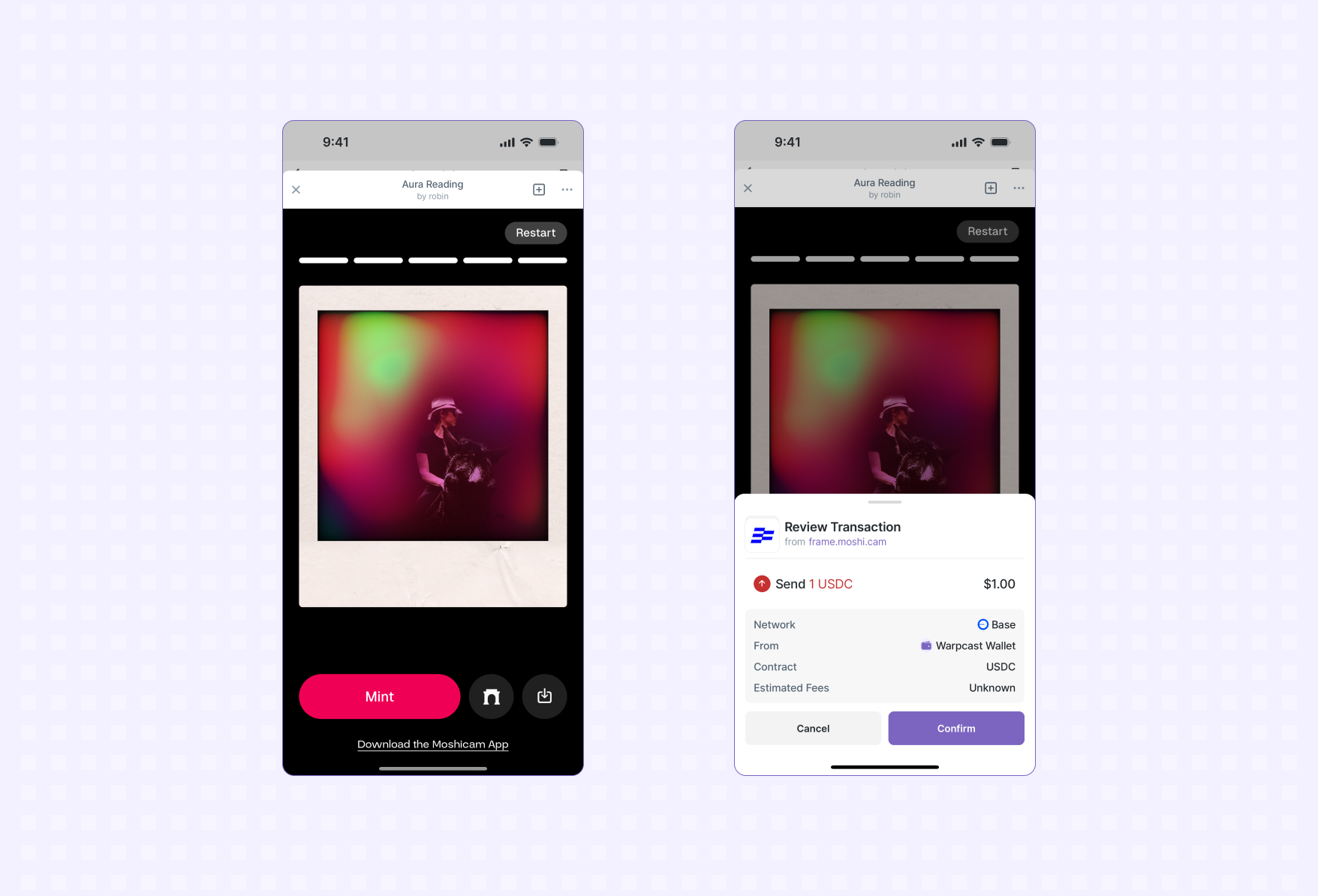
*A user minting an NFT using the Warpcast Wallet.*
## Getting Started
The Mini App SDK exposes an [EIP-1193 Ethereum Provider
API](https://eips.ethereum.org/EIPS/eip-1193) at `sdk.wallet.getEthereumProvider()`.
We recommend using [Wagmi](https://wagmi.sh) to connect to and interact with
the user's wallet. This is not required but provides high-level hooks for
interacting with the wallet in a type-safe way.
### Setup Wagmi
Use the [Getting Started
guide](https://wagmi.sh/react/getting-started#manual-installation) to setup
Wagmi in your project.
### Install the connector
Next we'll install a Wagmi connector that will be used to interact with the
user's wallet:
```bash npm theme={"system"}
npm install @farcaster/miniapp-wagmi-connector
```
```bash pnpm theme={"system"}
pnpm add @farcaster/miniapp-wagmi-connector
```
```bash yarn theme={"system"}
yarn add @farcaster/miniapp-wagmi-connector
```
### Add to Wagmi configuration
Add the Mini App connector to your Wagmi config:
```ts theme={"system"}
import { http, createConfig } from 'wagmi'
import { base } from 'wagmi/chains'
import { farcasterMiniApp as miniAppConnector } from '@farcaster/miniapp-wagmi-connector'
export const config = createConfig({
chains: [base],
transports: {
[base.id]: http(),
},
connectors: [
miniAppConnector()
]
})
```
### Connect to the wallet
If a user already has a connected wallet the connector will automatically
connect to it (e.g. `isConnected` will be true).
It's possible a user doesn't have a connected wallet so you should always check
for a connection and prompt them to connect if they aren't already connected:
```tsx theme={"system"}
import { useAccount, useConnect } from 'wagmi'
function ConnectMenu() {
const { isConnected, address } = useAccount()
const { connect, connectors } = useConnect()
if (isConnected) {
return (
<>
You're connected!
Address: {address}
)
}
return (
)
}
```
Your Mini App won't need to show a wallet selection dialog that is common in a
web based dapp, the Farcaster client hosting your app will take care of getting
the user connected to their preferred crypto wallet.
You're now ready to prompt the user to transact. They will be shown a preview
of the transaction in their wallet and asked to confirm it:
Follow [this guide from
Wagmi](https://wagmi.sh/react/guides/send-transaction#_2-create-a-new-component)
on sending a transaction (note: skip step 1 since you're already connected to
the user's wallet).
## Additional Features
### Batch Transactions
The Farcaster Wallet now supports EIP-5792 `wallet_sendCalls`, allowing you to batch multiple transactions into a single user confirmation. This improves the user experience by enabling operations like "approve and swap" in one step.
Common use cases include:
* Approving a token allowance and executing a swap
* Multiple NFT mints in one operation
* Complex DeFi interactions requiring multiple contract calls
#### Using Batch Transactions
With Wagmi's `useSendCalls` hook, sending multiple transactions as a batch is simple:
```tsx theme={"system"}
import { useSendCalls } from 'wagmi'
import { parseEther } from 'viem'
function BatchTransfer() {
const { sendCalls } = useSendCalls()
return (
)
}
```
#### Example: Token Approval and Swap
```tsx theme={"system"}
import { useSendCalls } from 'wagmi'
import { encodeFunctionData, parseUnits } from 'viem'
function ApproveAndSwap() {
const { sendCalls } = useSendCalls()
const handleApproveAndSwap = () => {
sendCalls({
calls: [
// Approve USDC
{
to: '0xA0b86991c6218b36c1d19D4a2e9Eb0cE3606eB48',
data: encodeFunctionData({
abi: erc20Abi,
functionName: 'approve',
args: ['0x7a250d5630B4cF539739dF2C5dAcb4c659F2488D', parseUnits('100', 6)]
})
},
// Swap USDC for ETH
{
to: '0x7a250d5630B4cF539739dF2C5dAcb4c659F2488D',
data: encodeFunctionData({
abi: uniswapAbi,
functionName: 'swapExactTokensForETH',
args: [/* swap parameters */]
})
}
]
})
}
return (
)
}
```
All transactions are individually validated and scanned for security, maintaining the same safety guarantees as single transactions.
**Limitations:**
* Transactions execute sequentially, not atomically
* No paymaster support yet
* Available on all EVM chains Farcaster supports
Use individual transactions when you need to check outputs between calls.
## Troubleshooting
### Transaction Scanning
Modern crypto wallets scan transactions and preview them to users to help
protect users from scams. New contracts and applications can generate false
positives in these systems. If your transaction is being reported as
potentially malicious use this [Blockaid
Tool](https://report.blockaid.io/verifiedProject) to verify your app with
Blockaid.
 *A user minting an NFT using the Warpcast Wallet.*
## Getting Started
The Mini App SDK exposes an [EIP-1193 Ethereum Provider
API](https://eips.ethereum.org/EIPS/eip-1193) at `sdk.wallet.getEthereumProvider()`.
We recommend using [Wagmi](https://wagmi.sh) to connect to and interact with
the user's wallet. This is not required but provides high-level hooks for
interacting with the wallet in a type-safe way.
*A user minting an NFT using the Warpcast Wallet.*
## Getting Started
The Mini App SDK exposes an [EIP-1193 Ethereum Provider
API](https://eips.ethereum.org/EIPS/eip-1193) at `sdk.wallet.getEthereumProvider()`.
We recommend using [Wagmi](https://wagmi.sh) to connect to and interact with
the user's wallet. This is not required but provides high-level hooks for
interacting with the wallet in a type-safe way.