> ## Documentation Index
> Fetch the complete documentation index at: https://docs.neynar.com/llms.txt
> Use this file to discover all available pages before exploring further.
# Run Snapchain on AWS
> Step-by-step guide to running a Snapchain node on AWS EC2
If your goal is to get started as quickly as possible, consider a managed service like [Neynar](https://neynar.com/) instead of running your own node.
This guide will get you set up with a Snapchain node on an AWS EC2 instance and will cost roughly \$100/month. You can run Snapchain on any server you like and costs may vary depending on provider.
## Launch a new instance
1. In AWS, go to EC2 > Instances > Launch Instances
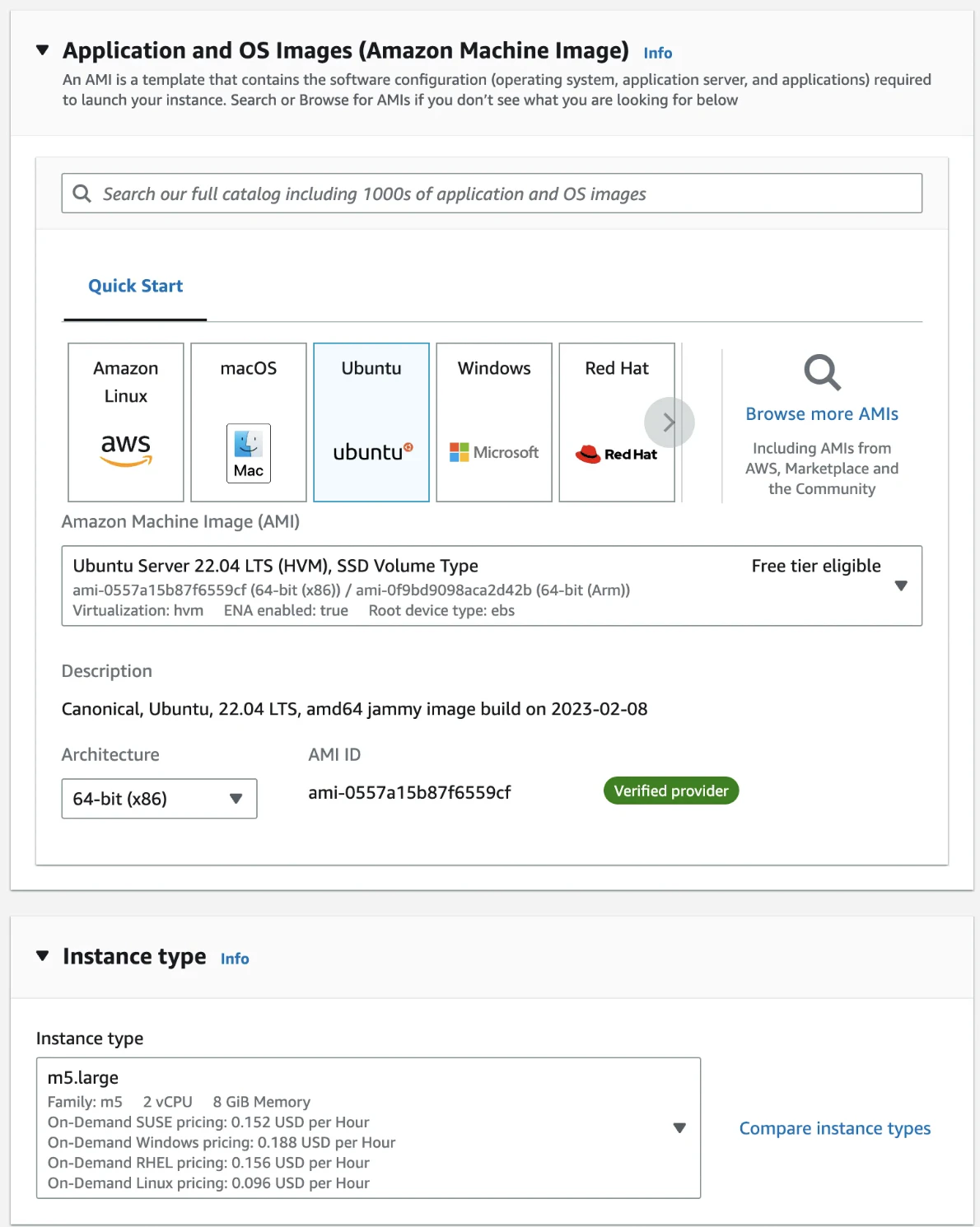
2. Give it a name and select Ubuntu Server 22.04 LTS (HVM), SSD Volume Type and 64-bit (x86). Choose m5.xlarge instance type.
 3. In Key pair (login), select Create a new key pair, then select RSA and .pem format, and save it
4. In Network settings, select Allow SSH traffic from Anywhere
5. In Configure storage, select 2 TB of gp3 storage.
6. Click Launch Instance on the right-hand side menu.
## Configure network firewall
1. Go to EC2 → Instances and find your instance
2. Click on the Instance ID
3. Click on Security > Security groups > (Security Group ID)
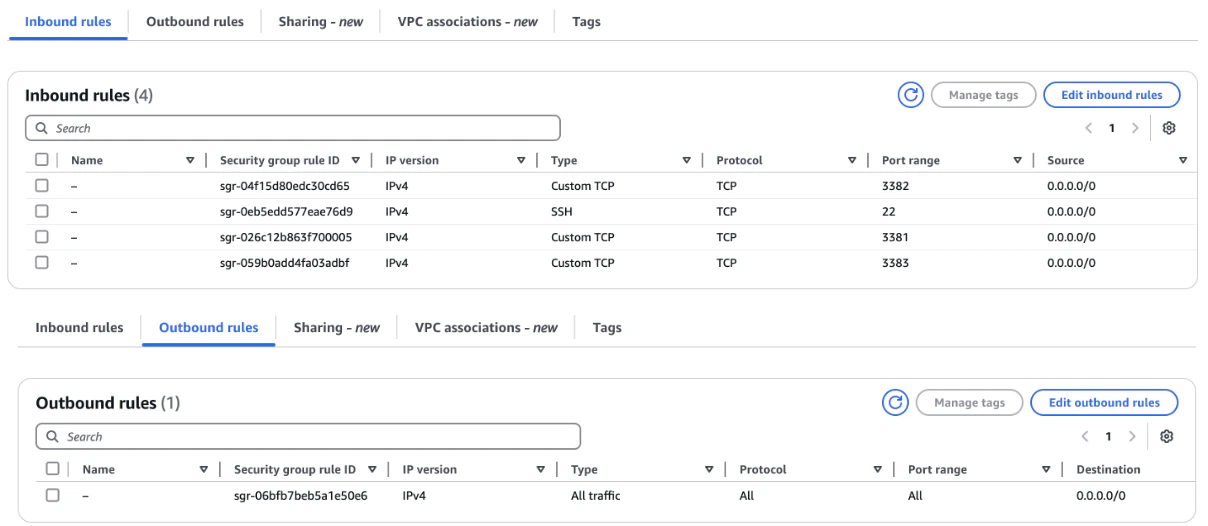
4. Click on Edit inbound rules and Edit outbound rules on the group page and add rules until they match the below.
3. In Key pair (login), select Create a new key pair, then select RSA and .pem format, and save it
4. In Network settings, select Allow SSH traffic from Anywhere
5. In Configure storage, select 2 TB of gp3 storage.
6. Click Launch Instance on the right-hand side menu.
## Configure network firewall
1. Go to EC2 → Instances and find your instance
2. Click on the Instance ID
3. Click on Security > Security groups > (Security Group ID)
4. Click on Edit inbound rules and Edit outbound rules on the group page and add rules until they match the below.
 ## Connect to your instance
1. Find your *.pem* file from earlier and run `chmod 400 key.pem`
2. Go to EC2 → Instances, click on the Instance ID and copy the IPv4 Address
3. Connect with `ssh ubuntu@ -i key.pem`
## Start syncing a node
```bash theme={"system"}
# Install docker
curl -fsSL https://get.docker.com -o get-docker.sh
chmod +x get-docker.sh
./get-docker.sh
# Start Snapchain
mkdir snapchain && cd snapchain
curl -sSL https://raw.githubusercontent.com/farcasterxyz/snapchain/refs/heads/main/scripts/snapchain-bootstrap.sh | bash
```
Follow the remaining steps in [Getting Started](/snapchain/getting-started) to validate and query your node.
## Related topics
- [From Parquet Exports](/docs/parquet.md)
- [What is Snapchain?](/snapchain/overview.md)
- [Writing to Snapchain](/snapchain/guides/writing-messages.md)
- [Indexer Service - Neynar API](/docs/indexer-service-pipe-farcaster-data.md)
- [Indexer Service Requirements](/docs/requirements-for-indexer-service.md)
## Connect to your instance
1. Find your *.pem* file from earlier and run `chmod 400 key.pem`
2. Go to EC2 → Instances, click on the Instance ID and copy the IPv4 Address
3. Connect with `ssh ubuntu@ -i key.pem`
## Start syncing a node
```bash theme={"system"}
# Install docker
curl -fsSL https://get.docker.com -o get-docker.sh
chmod +x get-docker.sh
./get-docker.sh
# Start Snapchain
mkdir snapchain && cd snapchain
curl -sSL https://raw.githubusercontent.com/farcasterxyz/snapchain/refs/heads/main/scripts/snapchain-bootstrap.sh | bash
```
Follow the remaining steps in [Getting Started](/snapchain/getting-started) to validate and query your node.
## Related topics
- [From Parquet Exports](/docs/parquet.md)
- [What is Snapchain?](/snapchain/overview.md)
- [Writing to Snapchain](/snapchain/guides/writing-messages.md)
- [Indexer Service - Neynar API](/docs/indexer-service-pipe-farcaster-data.md)
- [Indexer Service Requirements](/docs/requirements-for-indexer-service.md)