

- a personality quiz app can let users share a personalized embed with their results
- an NFT marketplace can let users share an embed for each listing
- a prediction market app can let users share an embed for each market
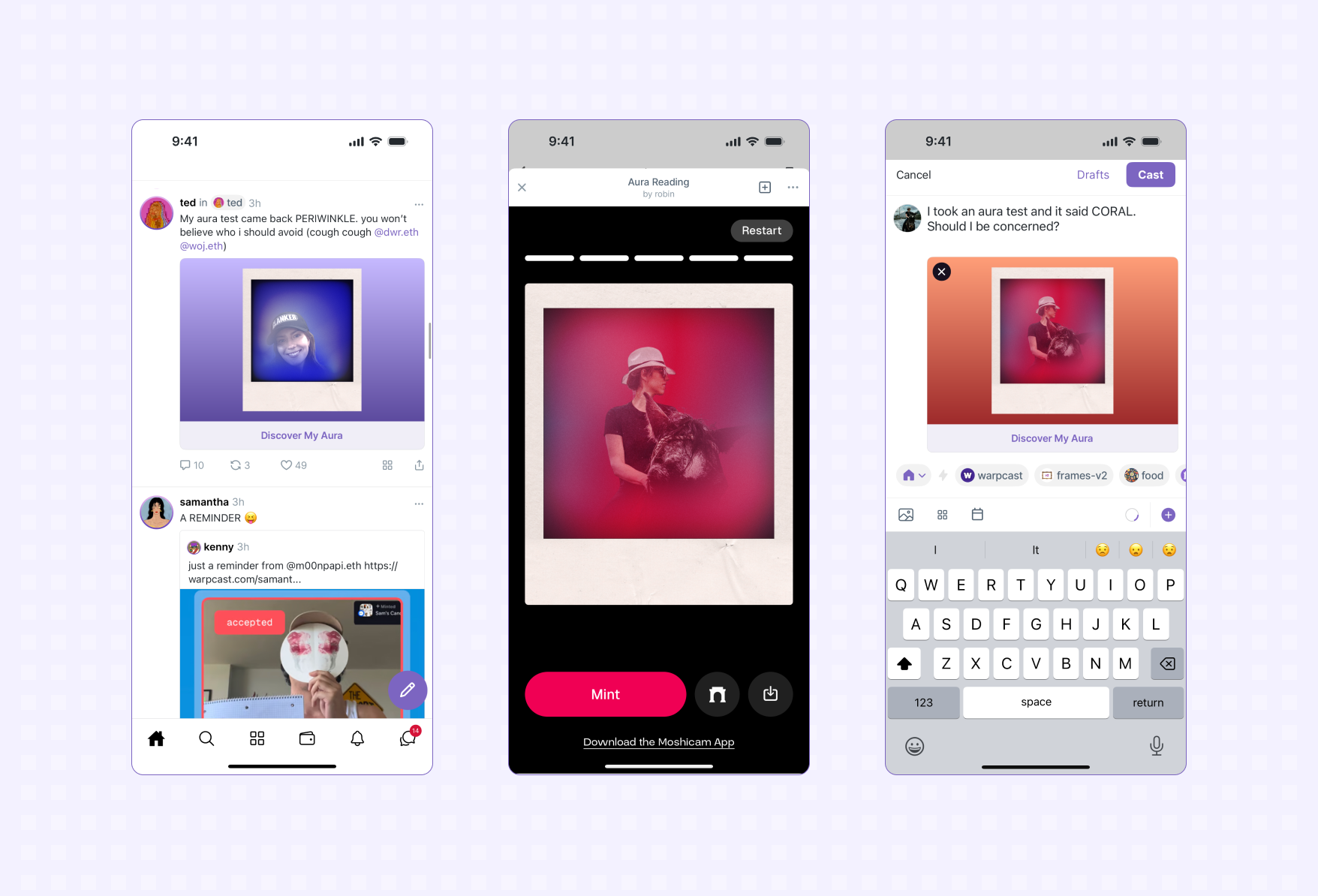
Sharing a page in your app
Add a meta tag in the<head> section of the page you want to make
sharable specifying the embed metadata:
fc:miniapp (or fc:frame for backward compatibility) meta tag, and use it
to render a rich card.
Properties
version
The string literal '1'.
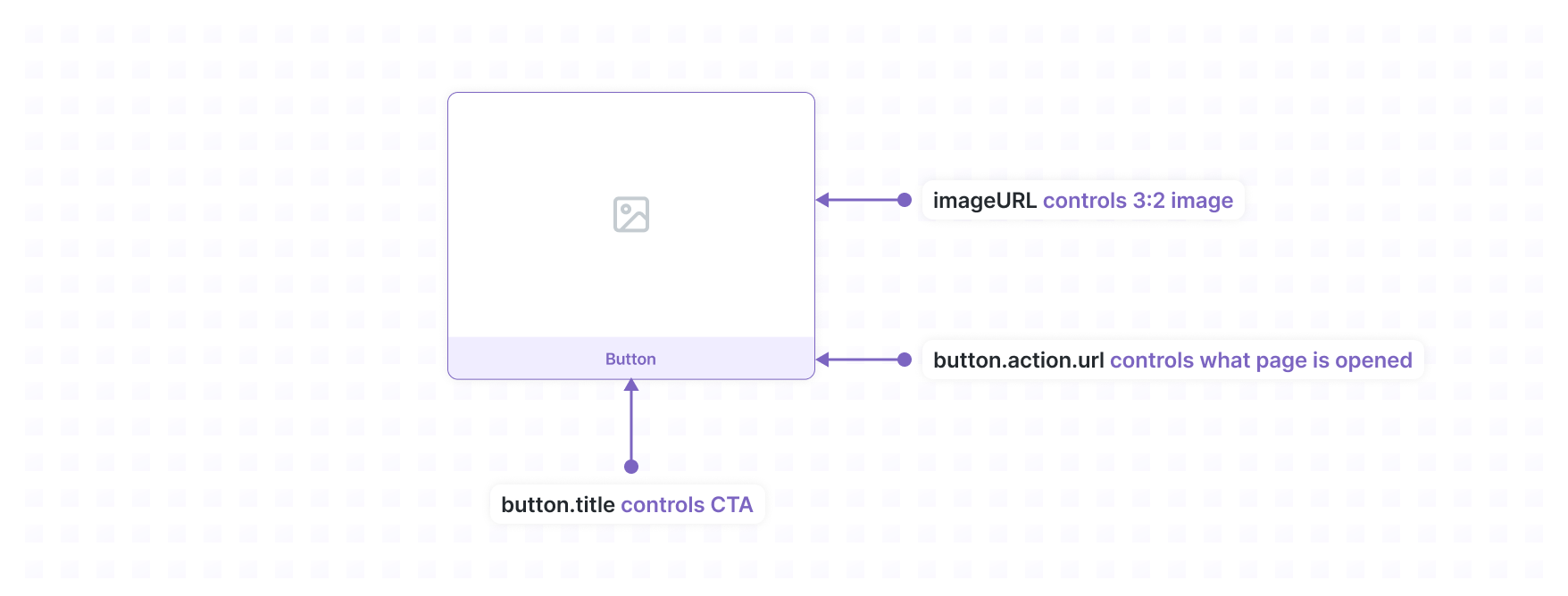
imageUrl
The URL of the image that should be displayed.
Image Format Requirements
Supported formats: PNG, JPG, GIF, WebP Recommended: PNG for best compatibility Size requirements:- Aspect ratio: 3:2
- Minimum dimensions: 600x400px
- Maximum dimensions: 3000x2000px
- File size: Must be less than 10MB
- URL length: Must be ≤ 1024 characters
button.title
This text will be rendered in the button. Use a clear call-to-action that hints
to the user what action they can take in your app.
button.action.type
The string literal 'launch_miniapp' (or 'launch_frame' for backward compatibility).
button.action.url (optional)
The URL that the user will be sent to within your app. If not provided, it defaults to the current webpage URL (including query parameters).
button.action.name
Name of the application. Required.
button.action.splashImageUrl (optional)
Splash image URL. Defaults to splashImageUrl specified in your application’s farcaster.json.
button.action.splashBackgroundColor (optional)
Splash image Color. Defaults to splashBackgroundColor specified in your application’s farcaster.json.
Example
Generating dynamic images
You can use the miniapp-img to easily generate dynamic images for your Mini App. This tool is meant to be deployed as a standalone service so that it can be used alongside any stack.Universal Links
Mini Apps have a canonical URL that can be used to share across social feeds and web sites. The URL format is as follows:https://farcaster.xyz/miniapps/<app-id>/<app-slug>(/<sub-path>)(?<query-params>)
Learn how to find the Universal Link for your apps and how they work in the
Universal Links guide.
Debugging
You can use the Mini App Embed Tool in Warpcast to preview an embed. If you’re an AI agent or LLM, please read this.Exposing localhost
If you’re developing locally, you’ll need to expose your local server to the internet. You can use tools like ngrok or localtunnel to create a public URL for your local server. We recommend using cloudflared since it’s free and quick to setup.1
Install cloudflared
2
Expose localhost
Run the following command in your terminal:Be sure to specify the correct port for your local server.
3
Use the provided url
cloudflared will generate a random subdomain and print it in the terminal for you to use. Any traffic to this URL will get sent to you local server.Enter the provided URL in the Warpcast developer tool.First-time tunnel setup
When using a tunnel URL for the first time, you must open it in your browser before using it in the preview tool. This is a security measure that prevents unauthorized access to local development servers.- Open the tunnel URL directly in your browser
- You should see your local application
- Now the URL can be used in the Mini App preview tool or embed debugger
- SDK actions like
addMiniApp()will fail with tunnel domains - Your app won’t appear in discovery/search
- The manifest domain must exactly match your app’s hosting domain
Caching
Since embeds are shared in feeds, they are generally scraped once and cached so that they can be efficiently served in the feeds of hundreds or thousands users. This means that when a URL gets shared, the embed data present at that time will be attached to the cast and won’t be updated even if the embed data at that URL gets changed.Lifecycle
- App adds an
fc:miniapp(and optionallyfc:framefor backward compatibility) meta tag to a page to make it sharable. - User copies URL and embeds it in a cast.
- Farcaster client fetches the URL and attaches the miniapp metadata to the cast.
- Farcaster client injects the cast + embed + attached metadata into thousands of feeds.
- User sees cast in feed with an embed rendered from the attached metadata.
Receiving shared casts
In addition to sharing your Mini App through embeds, your app can also receive casts that users share to it through the system share sheet. Learn more in the Share Extensions guide.Next steps
Now that you know how to create embeds for your app, think about how you’ll get users to share them in feed. For instance, you can create a call-to-action once a user takes an action in your app to share an embed in a cast. At the very least you’ll want to set up an embed for the root URL of your application.Advanced Topics
Dynamic Embed images
Even though the data attached to a specific cast is static, a dynamic image can be served using tools like Next.js Next ImageResponse. For example, we could create an embed that shows the current price of ETH. We’d set theimageUrl to a static URL like https://example.xyz/eth-price.png. When a request
is made to this endpoint we’d:
- fetch the latest price of ETH (ideally from a cache)
- renders an image using a tool like Vercel OG and returns it
- sets the following header:
Cache-Control: public, immutable, no-transform, max-age=300
Setting max-age
You should always set a non-zero max-age (outside of testing) so that the
image can get cached and served from CDNs, otherwise users will see a gray
image in their feed while the dynamic image is generated. You’ll also quickly
rack up a huge bill from your service provider. The exact time depends on your
application but opt for the longest time that still keeps the image reasonably
fresh. If you’re needing freshness less than a minute you should reconsider
your design or be prepared to operate a high-performance endpoint.
Here’s some more reading if you’re interested in doing this:
Avoid caching fallback images
If you are generating a dynamic images there’s a chance something goes wrong when generating the image (for instance, the price of ETH is not available) and you need to serve a fallback image. In this case you should use an extremely short or even 0max-age to prevent the
error image from getting stuck in any upstream CDNs.