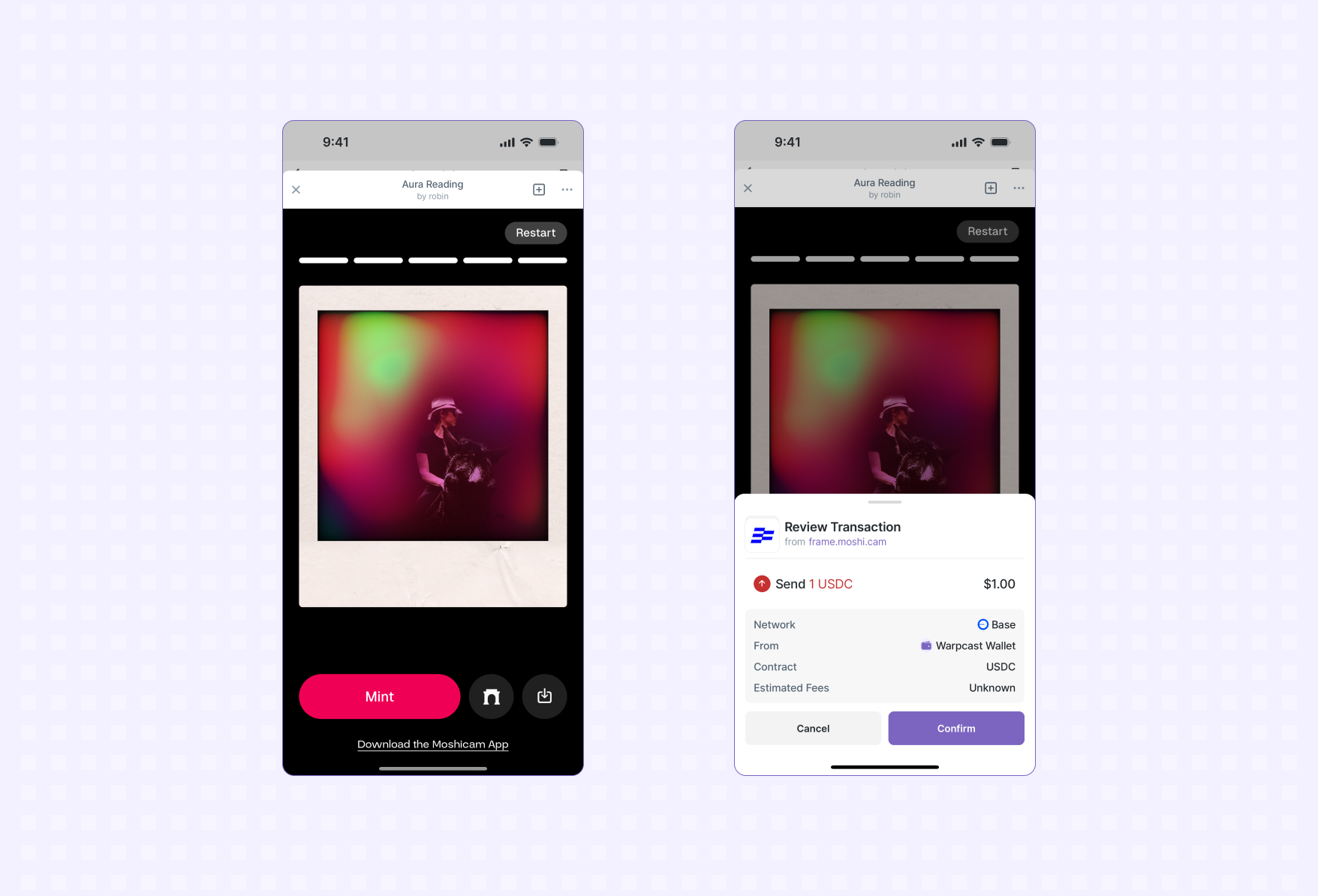
Mini Apps can interact with a user’s EVM wallet without needing to worry about popping open “select your wallet” dialogs or flaky connections. users taking onchain action from app A user minting an NFT using the Warpcast Wallet.

Getting Started

The Mini App SDK exposes an EIP-1193 Ethereum Provider API at sdk.wallet.getEthereumProvider(). We recommend using Wagmi to connect to and interact with the user’s wallet. This is not required but provides high-level hooks for interacting with the wallet in a type-safe way.
1
Setup Wagmi
2
Use the Getting Started guide to setup Wagmi in your project.
3
Install the connector
4
Next we’ll install a Wagmi connector that will be used to interact with the user’s wallet:
5
npm
npm install @farcaster/miniapp-wagmi-connector
pnpm
pnpm add @farcaster/miniapp-wagmi-connector
yarn
yarn add @farcaster/miniapp-wagmi-connector
6
Add to Wagmi configuration
7
Add the Mini App connector to your Wagmi config:
8
import { http, createConfig } from 'wagmi'
import { base } from 'wagmi/chains'
import { farcasterMiniApp as miniAppConnector } from '@farcaster/miniapp-wagmi-connector'

export const config = createConfig({
  chains: [base],
  transports: {
    [base.id]: http(),
  },
  connectors: [
    miniAppConnector()
  ]
})
9
Connect to the wallet
10
If a user already has a connected wallet the connector will automatically connect to it (e.g. isConnected will be true).
11
It’s possible a user doesn’t have a connected wallet so you should always check for a connection and prompt them to connect if they aren’t already connected:
12
import { useAccount, useConnect } from 'wagmi'

function ConnectMenu() {
  const { isConnected, address } = useAccount()
  const { connect, connectors } = useConnect()

  if (isConnected) {
    return (
      <>
        <div>You're connected!</div>
        <div>Address: {address}</div>
      </>
    )
  }

  return (
    <button
      type="button"
      onClick={() => connect({ connector: connectors[0] })}
    >
      Connect
    </button>
  )
}
13
Your Mini App won’t need to show a wallet selection dialog that is common in a web based dapp, the Farcaster client hosting your app will take care of getting the user connected to their preferred crypto wallet.
14
Send a transaction
15
You’re now ready to prompt the user to transact. They will be shown a preview of the transaction in their wallet and asked to confirm it:
16
Follow this guide from Wagmi on sending a transaction (note: skip step 1 since you’re already connected to the user’s wallet).

Additional Features

Batch Transactions

The Farcaster Wallet now supports EIP-5792 wallet_sendCalls, allowing you to batch multiple transactions into a single user confirmation. This improves the user experience by enabling operations like “approve and swap” in one step. Common use cases include:
  • Approving a token allowance and executing a swap
  • Multiple NFT mints in one operation
  • Complex DeFi interactions requiring multiple contract calls

Using Batch Transactions

With Wagmi’s useSendCalls hook, sending multiple transactions as a batch is simple:
import { useSendCalls } from 'wagmi'
import { parseEther } from 'viem'

function BatchTransfer() {
  const { sendCalls } = useSendCalls()

  return (
    <button
      onClick={() =>
        sendCalls({
          calls: [
            {
              to: '0x70997970C51812dc3A010C7d01b50e0d17dc79C8',
              value: parseEther('0.01')
            },
            {
              to: '0x3C44CdDdB6a900fa2b585dd299e03d12FA4293BC',
              value: parseEther('0.02')
            }
          ]
        })
      }
    >
      Send Batch Transfer
    </button>
  )
}

Example: Token Approval and Swap

import { useSendCalls } from 'wagmi'
import { encodeFunctionData, parseUnits } from 'viem'

function ApproveAndSwap() {
  const { sendCalls } = useSendCalls()

  const handleApproveAndSwap = () => {
    sendCalls({
      calls: [
        // Approve USDC
        {
          to: '0xA0b86991c6218b36c1d19D4a2e9Eb0cE3606eB48',
          data: encodeFunctionData({
            abi: erc20Abi,
            functionName: 'approve',
            args: ['0x7a250d5630B4cF539739dF2C5dAcb4c659F2488D', parseUnits('100', 6)]
          })
        },
        // Swap USDC for ETH
        {
          to: '0x7a250d5630B4cF539739dF2C5dAcb4c659F2488D',
          data: encodeFunctionData({
            abi: uniswapAbi,
            functionName: 'swapExactTokensForETH',
            args: [/* swap parameters */]
          })
        }
      ]
    })
  }

  return (
    <button onClick={handleApproveAndSwap}>
      Approve & Swap
    </button>
  )
}
All transactions are individually validated and scanned for security, maintaining the same safety guarantees as single transactions.
Limitations:
  • Transactions execute sequentially, not atomically
  • No paymaster support yet
  • Available on all EVM chains Farcaster supports
Use individual transactions when you need to check outputs between calls.

Troubleshooting

Transaction Scanning

Modern crypto wallets scan transactions and preview them to users to help protect users from scams. New contracts and applications can generate false positives in these systems. If your transaction is being reported as potentially malicious use this Blockaid Tool to verify your app with Blockaid.